





You might be considering Spellbook if you want to review and draft contracts faster inside Microsoft Word. It does that well. But for most enterprise legal teams, speed alone does not solve the problem.
As volume grows, legal professionals needs more than redlines in a document. They need consistent decisions across teams and jurisdictions, visibility across contract portfolios, legal research tied to official sources, and workflows that extend beyond the contract itself. LEGALFLY is built for that broader job. Here is how the two platforms compare.
If your team needs more than faster redlines in Word, see how LEGALFLY handles contract review, legal research, and regulatory change in one platform. Book a demo.
What is LEGALFLY?
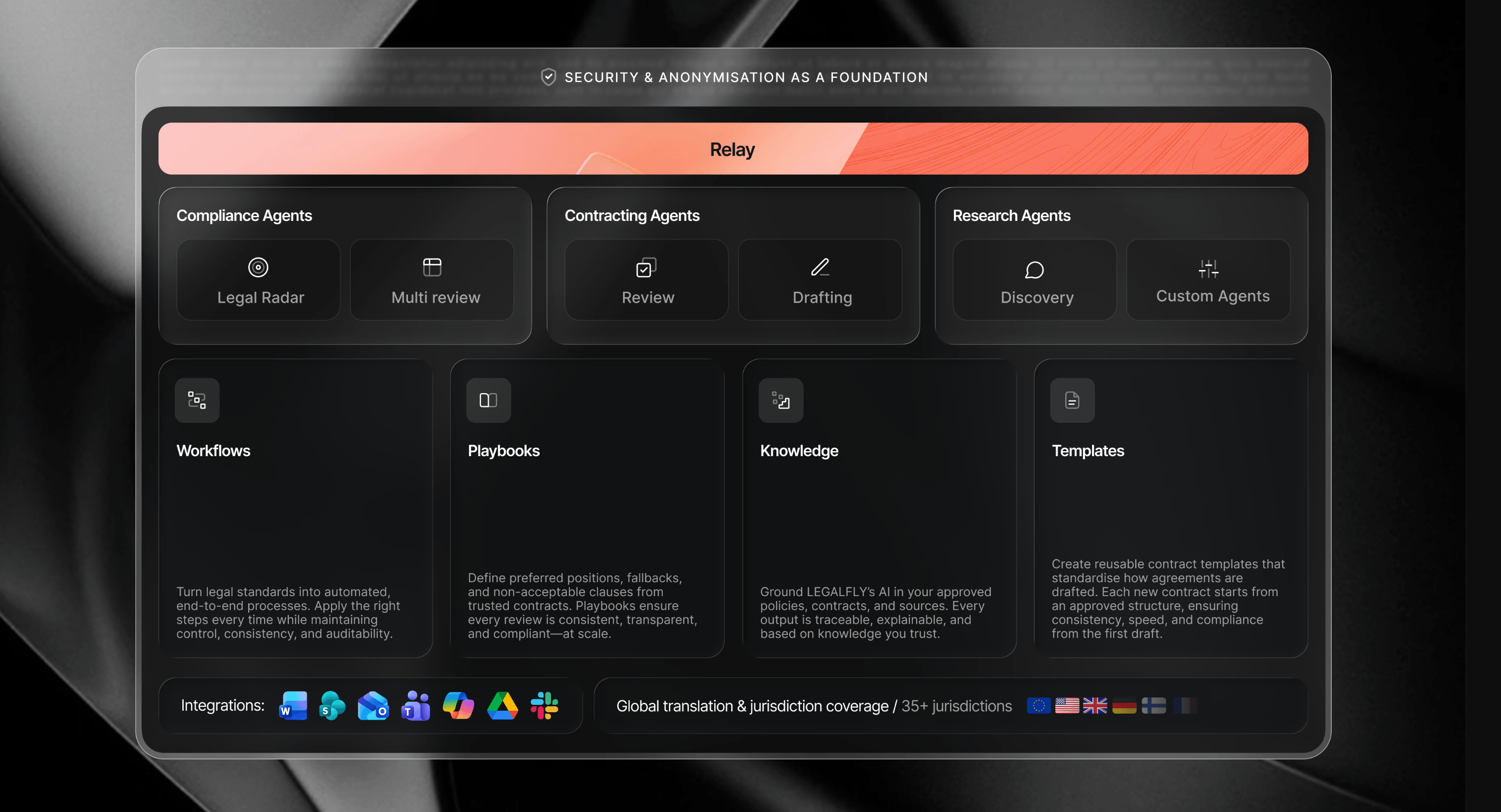
LEGALFLY is a legal AI platform for enterprise in-house legal, compliance, and procurement teams. It runs inside Microsoft Word, Teams, SharePoint, Outlook, Copilot, and Slack. When you review a contract, the AI works from your own legal positions, not a generic baseline or market standard.
Its legal research draws from 500+ official sources across 60+ jurisdictions. Legal Radar monitors regulatory developments and alerts your team before changes affect your contracts. The Multi-Review Agent processes large batches of contracts simultaneously and ranks results by how far each deviates from your positions. With Agent Studio, you can build and deploy customised AI workflows that cover everything from intake to approval, while maintaining a human in the loop.
What is Spellbook?
Spellbook is a Toronto-based AI contract review and drafting tool that runs inside Microsoft Word. Used by over 4,000 legal teams, it is designed primarily for transactional lawyers, both at law firms and in-house, who want to move faster without leaving their existing Word workflow.
Spellbook reviews contracts, applies redlines, flags risks, drafts clauses, and compares terms against market data, all within Word. It is powered by large language models (currently GPT-5). Learn more here.
How Spellbook and LEGALFLY compare
Feature | Spellbook | LEGALFLY |
Contract review | Redlines and risk flags in Word. Compares to market standards and applies your instructions, playbooks, and clause library. | Playbook-driven review against your legal positions from day one, with fallback language and redrafts built in. |
Contract drafting | Drafts clauses, revisions, and full documents in Word from your precedents or AI. | Drafts in Word from your approved templates or from scratch, in your house style. |
Microsoft Word | Core working environment. Word add-in. | Full integration. Review, draft, research, and redline without leaving Word. |
Jurisdiction coverage | 100+ legal sources. Jurisdiction count not publicly documented. | 500+ official legal sources, 60+ jurisdictions, translate into 80 languages. |
Legal research | Answers with citations from 100+ legal sources. | Structured research across 500+ official sources including legislation, case law, and regulatory guidance. |
Regulatory monitoring | No. | Legal Radar monitors legislative and regulatory sources across 35+ jurisdictions and alerts your team before changes affect your contracts. |
Workflow automation | Playbooks and clause libraries within Word. Workflow stays centred on document review and drafting. | The Agent Studio lets you build custom workflows and agents across the full range of in-house legal tasks, from intake to approval. |
Data protection | SOC 2 Type II, GDPR, zero data retention. | Documents anonymised before any AI model processes them. ISO 27001. On-premises deployment available. |
Will it review contracts against my standards, or the market standard?
Some tools work from market patterns and inferred intent. Others work from the positions your team has already defined.
How Spellbook handles contract review
Spellbook's contract review runs in Word. It spots risks, flags non-market terms, identifies missing clauses, and applies redlines based on your instructions. The Compare to Market feature benchmarks terms against real data from contracts across 30 countries, which is useful when you want to know whether a counterparty's position is aggressive or standard.
You can build custom playbooks and save preferred language to a clause library, so the tool can apply your team's rules rather than relying on market benchmarks.
How LEGALFLY handles contract review
LEGALFLY simplifies the contract review process. The software's contract review runs against playbooks that encode your legal standards for every clause type your team handles. Each playbook captures your approved position, your fallback language if a counterparty pushes back, your non-negotiables, and the exact wording to use when a clause needs to be redrafted.
When a contract comes in, the AI compares each clause against those positions and produces a redraft that already reflects your answer. Your team reviews a proposed position, not a list of issues to work through.
LEGALFLY ships with 120+ pre-built playbooks across the most common document types. The AI Playbook Builder generates a first draft from a reference contract you already use. Setup takes minutes, and most teams are reviewing live contracts within the first week. This is what makes LEGALFLY among the top AI contract review options.
Verdict: Spellbook works from market data and your instructions. LEGALFLY encodes your legal positions and produces redrafts that reflect your rules, not a market average. See why LEGALFLY is the best alternative to Spellbook AI.
To find out how LEGALFLY could work for you, schedule a call with one of our experts.
Can it handle legal research, or just contract questions?
Legal research is one of the biggest gaps between the two platforms.
Spellbook's research capability
Spellbook provides answers with citations drawn from 100+ legal sources. You can ask questions about your contract, your deal, or the law directly in Word and get cited responses. It is useful for transactional lawyers who need quick answers without leaving their document. The scope of jurisdictional coverage is not publicly documented.
LEGALFLY's research capability
LEGALFLY's legal research draws from 500+ official legal sources, including legislation, case law, and regulatory guidance sourced directly from government bodies and legal publishers, across 60+ jurisdictions and 80 languages. https://www.legalfly.com/post/perplexity-ai-for-legal-research
Legal Radar adds proactive horizon scanning, monitoring legislative and regulatory sources across 35+ jurisdictions and alerting your team when something changes that could affect your contracts or compliance obligations.
To find out more about Perplexity AI's limitations in legal research and how LEGALFLY addresses them, check out our detailed post.
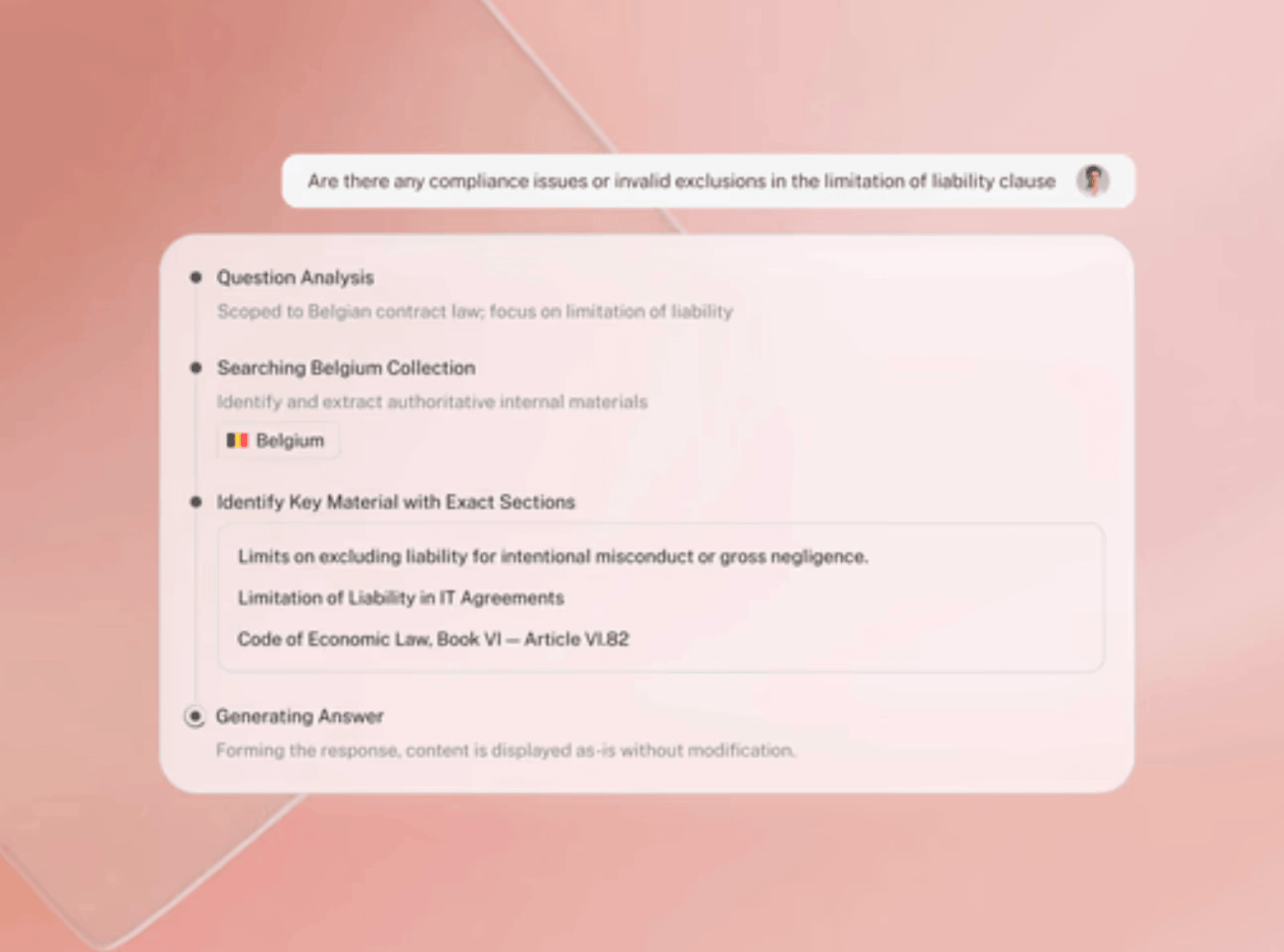
Verdict: Spellbook answers research questions in Word. LEGALFLY carries out structured legal research across 500+ official sources and proactively monitors regulatory change.
What happens to our data once it is uploaded?
Both platforms take data security seriously, but their approach to what happens to your document before the AI processes it is different.
Spellbook's approach to data security
Spellbook says it holds SOC 2 Type II certification, and is GDPR and HIPAA compliant, and operates a zero data retention policy, so your documents are not stored or used to train AI models.
LEGALFLY's approach to data security
LEGALFLY anonymises every document before it reaches any AI model. Names, commercial terms, counterparty details, and identifiable information are stripped at import, automatically, as part of the platform architecture. The AI processes anonymised data, so sensitive information never reaches the model in its original form. LEGALFLY holds ISO 27001 certification, is GDPR compliant, and offers on-premises and single-tenant deployment for regulated industries where data cannot leave a specific environment.
Learn more in our guide on how generative AI can be used safely by legal teams.
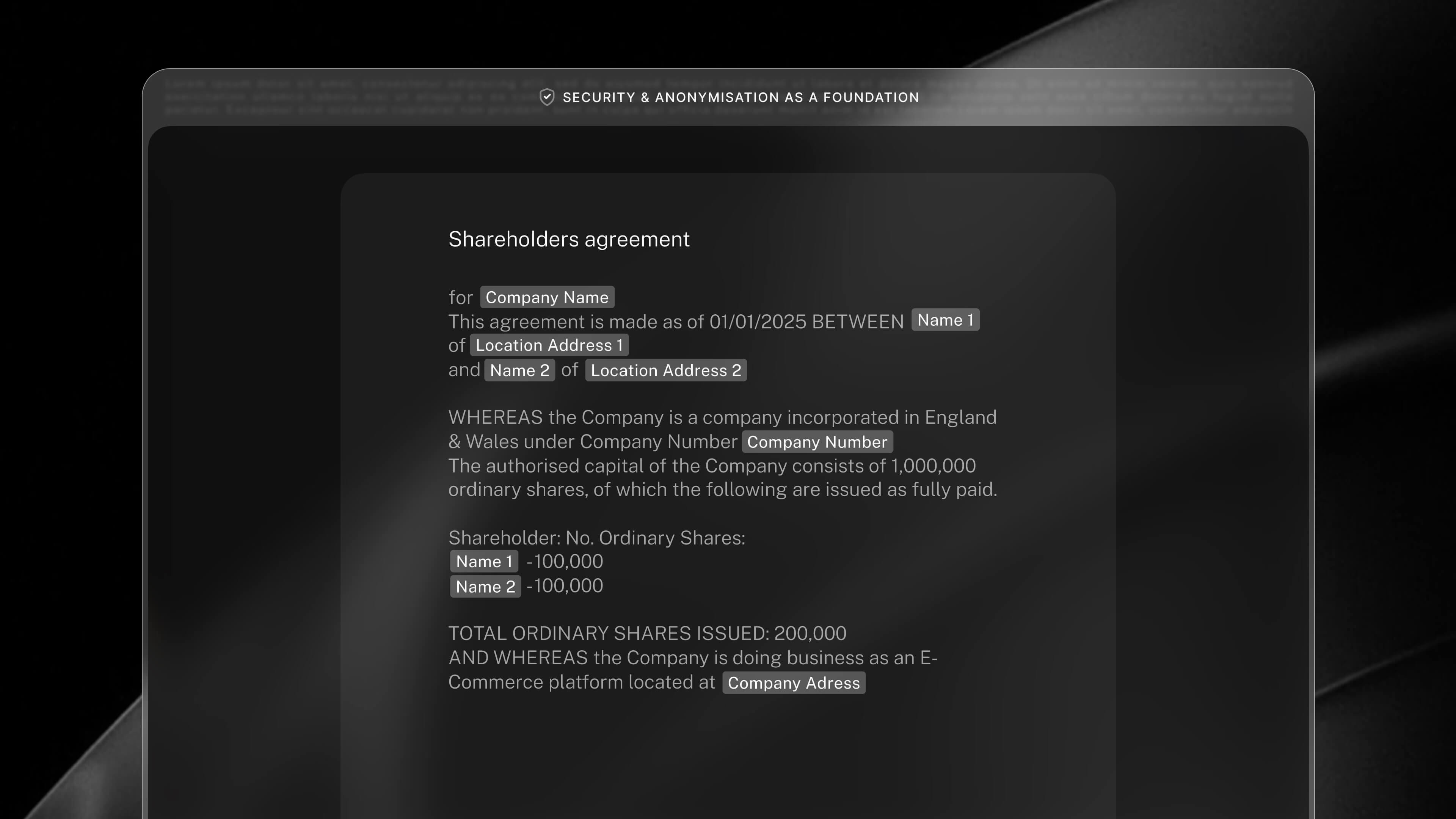
Verdict: Both platforms have strong security credentials, but only LEGALFLY removes identifiable data before it reaches any AI model.
Does it connect to the rest of our Microsoft 365 environment?
Both platforms work inside Microsoft Word, but that is not the only place AI is useful.
Spellbook's integrations
Spellbook is built around Word. It does not integrate with the broader Microsoft 365 environment. Contract requests from sales, procurement, or HR teams arrive through whatever channel those teams already use, and the connection to legal is manual.
LEGALFLY's integrations
LEGALFLY runs across the full Microsoft 365 stack: Word, Teams, SharePoint, Outlook, and Copilot, plus Slack. A contract request can come in through Outlook, be reviewed in Word, approved in Teams, and stored in SharePoint without anyone leaving the tools they already work in. Business teams submit requests through familiar channels and Legal receives them directly in LEGALFLY. That connected workflow reduces the manual handoffs that slow everything down.
Verdict: Spellbook is a Word add-in. LEGALFLY runs across the full Microsoft 365 stack, plus Slack, connecting legal to the rest of the business.
What happens when the contract queue gets out of hand?
High contract volume is where the gap between tools becomes most visible. Both platforms offer ways to move faster, but the approach and how much control you retain over standards as volume increases are meaningfully different.
How Spellbook handles volume
Spellbook's Associate agent reviews data rooms and multi-document sets, which moves it toward higher-volume use cases. At the individual contract level, it is fast. It says that reviews that previously took hours can be done in minutes.
How LEGALFLY handles volume
LEGALFLY's Multi-Review Agent runs your playbook across every document in a batch simultaneously and returns outputs ranked by deviation severity. You see which contracts fall outside your positions and by how much, across the whole portfolio, without opening each one individually. If you are managing large volumes of vendor agreements, renewals, or due diligence across a transaction, you know where to focus, rather than working through a queue blind.
Verdict: Spellbook speeds up individual contract review. LEGALFLY's Multi-Review Agent applies your playbook across batches and ranks results by risk, so you focus where it matters most.
Can it handle the full legal workflow, or just the contract?
Both platforms help with contract work, but that is not all an in-house legal team does.
Spellbook's workflow
Spellbook is built around the document in front of you. It helps you review, redline, draft, and compare terms inside Microsoft Word. Playbooks and clause libraries help standardise contract work, but the workflow stays centred on the contract itself.
Work around the contract still sits elsewhere. Intake, routing, due diligence coordination, regulatory monitoring, and cross-team approval depend on the tools and processes your team already uses outside Spellbook.
LEGALFLY's workflow
LEGALFLY covers the wider legal workflow. A request can come in through Outlook, Teams, or Slack, move into contract review or drafting, and then through approval and storage inside the same environment. Legal research, due diligence, and regulatory monitoring sit in the same platform rather than outside it.
The Agent Studio extends that further. Legal teams can configure automated workflows for contract intake, approval routing, regulatory impact summaries, and recurring legal queries, while keeping human oversight in place before anything is shared more widely. There is less work routed manually between people and tools, which boosts collaboration across business units and jurisdictions.

Verdict: Spellbook strengthens contract work inside Word. LEGALFLY supports the broader legal workflow across intake, review, research, due diligence, and approval.
How long before your team is using it?
Buying legal AI is one thing. Getting useful output from it is another.
Getting started with Spellbook
Spellbook is quick to start using because it runs inside Microsoft Word. Lawyers can begin reviewing and drafting contracts straight away in the environment they already know.
Consistency builds over time. Clause libraries, playbooks, and preferred positions can be added as usage grows, which works well for document-level work. For teams that need shared standards applied across users, contract types, and jurisdictions, that alignment can take longer.
Getting started with LEGALFLY
LEGALFLY combines faster setup with more control. The AI Playbook Builder creates a first draft playbook from a reference contract or internal guidance, and 120+ pre built playbooks cover common agreement types from the start.
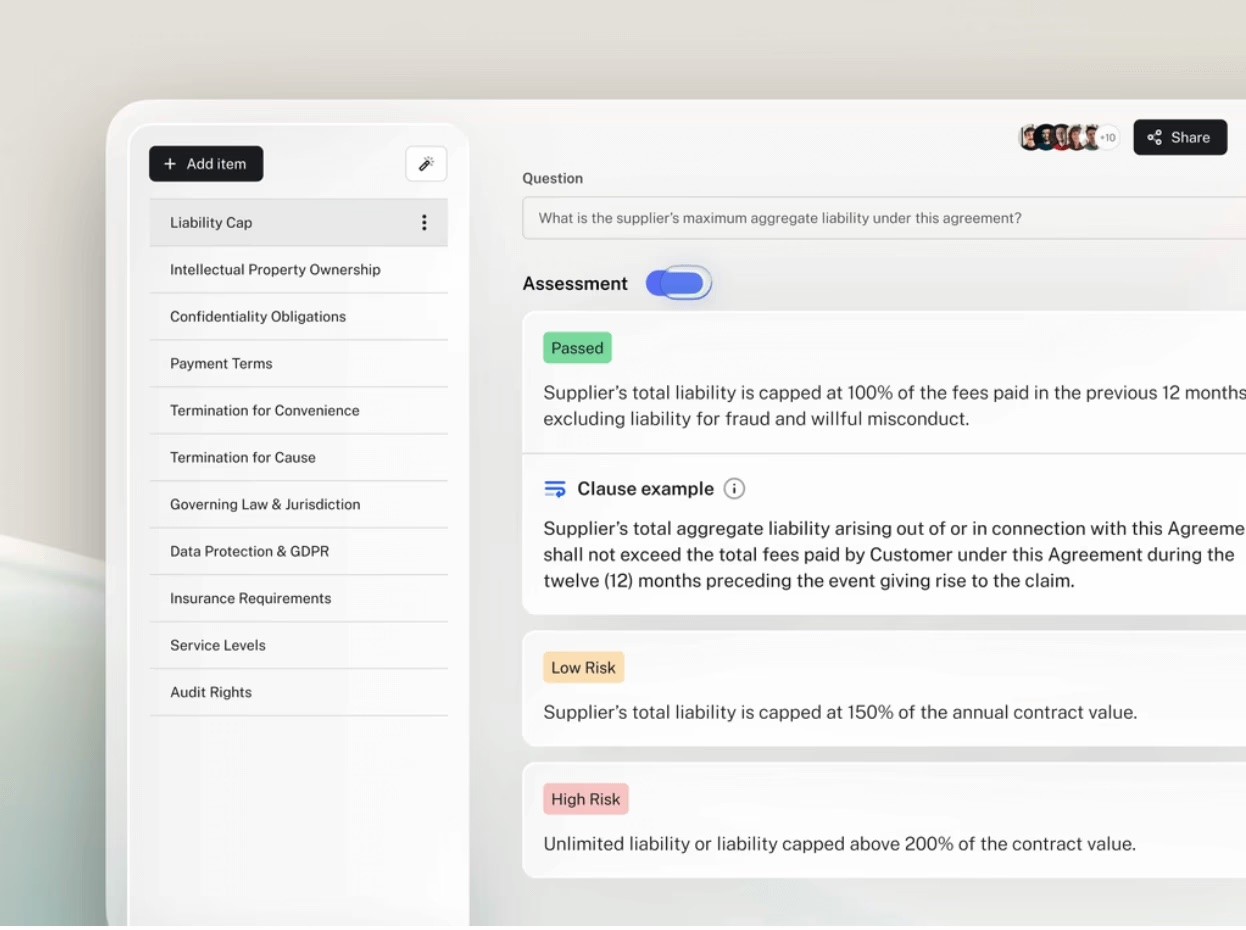
That means teams can begin reviewing live contracts quickly, without limiting the platform to document-level use. Playbooks, approved templates, legal research, regulatory monitoring, and multi-document review all sit in the same system.
How to build a playbook in LEGALFLY
Creating a playbook in LEGALFLY starts with your own standards. You describe the contract type you want to cover and upload a reference document such as an approved agreement or internal guidance. The Playbook Builder asks a few clarifying questions and generates a structured review framework in seconds, including the clauses to check, the assessments to run, fallback positions, and suggested redraft wording.
From there, you refine the playbook to match how your team actually negotiates. You can add conditional rules, adjust preferred language, and define escalation triggers. Version history keeps a clear record of updates, and once approved the playbook can be published for use across teams. Each contract reviewed against it follows the same logic, which helps maintain consistency as volume increases.

Verdict: Spellbook is fast to adopt in Word. LEGALFLY pairs fast setup with broader workflow coverage and stronger consistency from the start.
Which legal AI is right for my team?
Spellbook will work if your primary need is faster contract review and drafting inside Word, you work in transactional law at a firm or small in-house team, and you want AI assistance that fits directly into your existing Word workflow.
LEGALFLY is the right choice if you run an enterprise in-house legal function that spans contract review, legal research, regulatory monitoring, and coordination across business teams. It applies your legal standards from the first week, anonymises data before AI processing, connects across Microsoft 365, and covers the full range of what in-house counsel does, not just the contract in front of you.
Ready to move beyond faster redlines and run legal work on your own standards? See how LEGALFLY supports contract review, research, and regulatory workflows, in the tools you already use. Book a demo.
Note: this information was last updated in Q2 2026. For the most current information, check directly with each provider.