







DiliTrust and LEGALFLY both help in-house legal teams manage contracts and automate legal work, but they are built for different priorities.
DiliTrust is a broad governance suite with contract lifecycle management, matter management, entity management, and board governance in one platform.
LEGALFLY is more focused on AI-powered legal work, with a team of legal and engineering experts on hand to help you with set up, contract review, drafting, verified legal research, regulatory monitoring, and agent-led workflows. If you need faster review, source-backed research, regulation-to-contract analysis, or self-service workflows for the business, LEGALFLY may be better suited to your team.
This is an in-depth comparison of their key features, strengths, and limitations to help you decide which platform fits your legal department.
See how LEGALFLY compares on the work your team handles every day. Book a demo to test contract review, legal research, regulatory monitoring, and workflow automation on your own documents.
What is LEGALFLY?
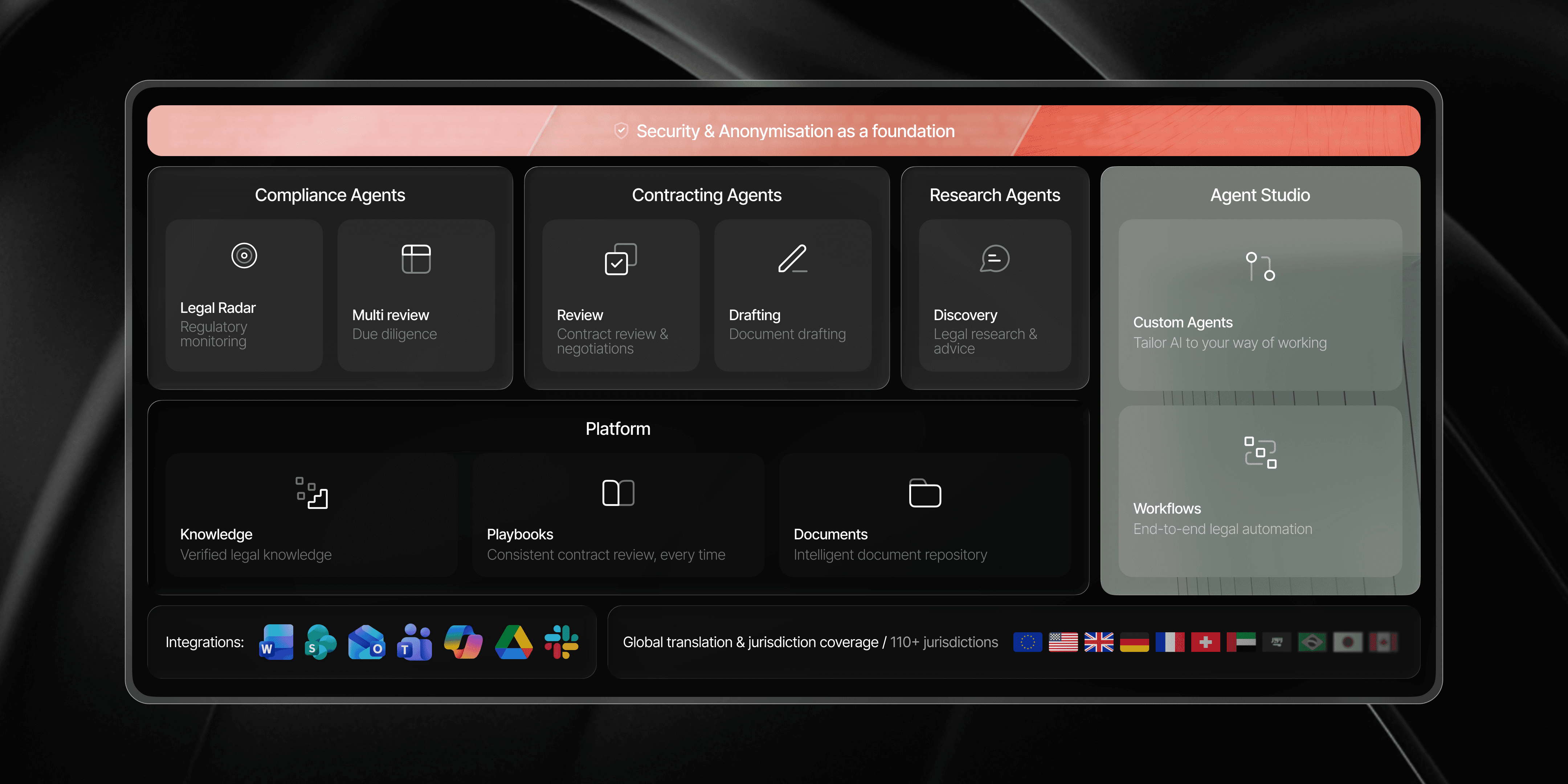
Based in Ghent, London, and Dubai, LEGALFLY is a legal AI platform built specifically for in-house teams. Its products cover contract review, drafting, verified legal research, regulatory monitoring, multi-document review, and Agent Studio, which lets teams build AI-led workflows from intake through lawyer approval.
LEGALFLY runs through a web platform, Microsoft Word, and Outlook, with integrations including SharePoint, Microsoft Teams, Copilot, Slack, and Google Drive. Documents are anonymised before AI processing. Teams at SAP, Lufthansa, AXA, and Bosch use it to review a contract in about 15 minutes and stay ahead of regulatory change.
See LEGALFLY on your own contracts. Book a demo and we'll walk you through the platform using contract types your team handles day-to-day.
What is DiliTrust?
Headquartered in Paris, DiliTrust is a corporate governance platform for enterprise legal, compliance, and governance teams. It combines contract lifecycle management, matter management, entity management, board governance, and a secure dataroom in one suite.
Its AI assistant, Lini, supports document extraction, summarisation, translation, and question-answering within DiliTrust’s private infrastructure. Learn more here.
DiliTrust vs LEGALFLY for contract review
LEGALFLY helps you review contracts faster and more consistently by applying approved playbooks, explaining each redline, and scanning entire contract portfolios for risk. DiliTrust compares clauses against a central library and flags deviations, with less automation and less visibility into why changes are suggested.
LEGALFLY
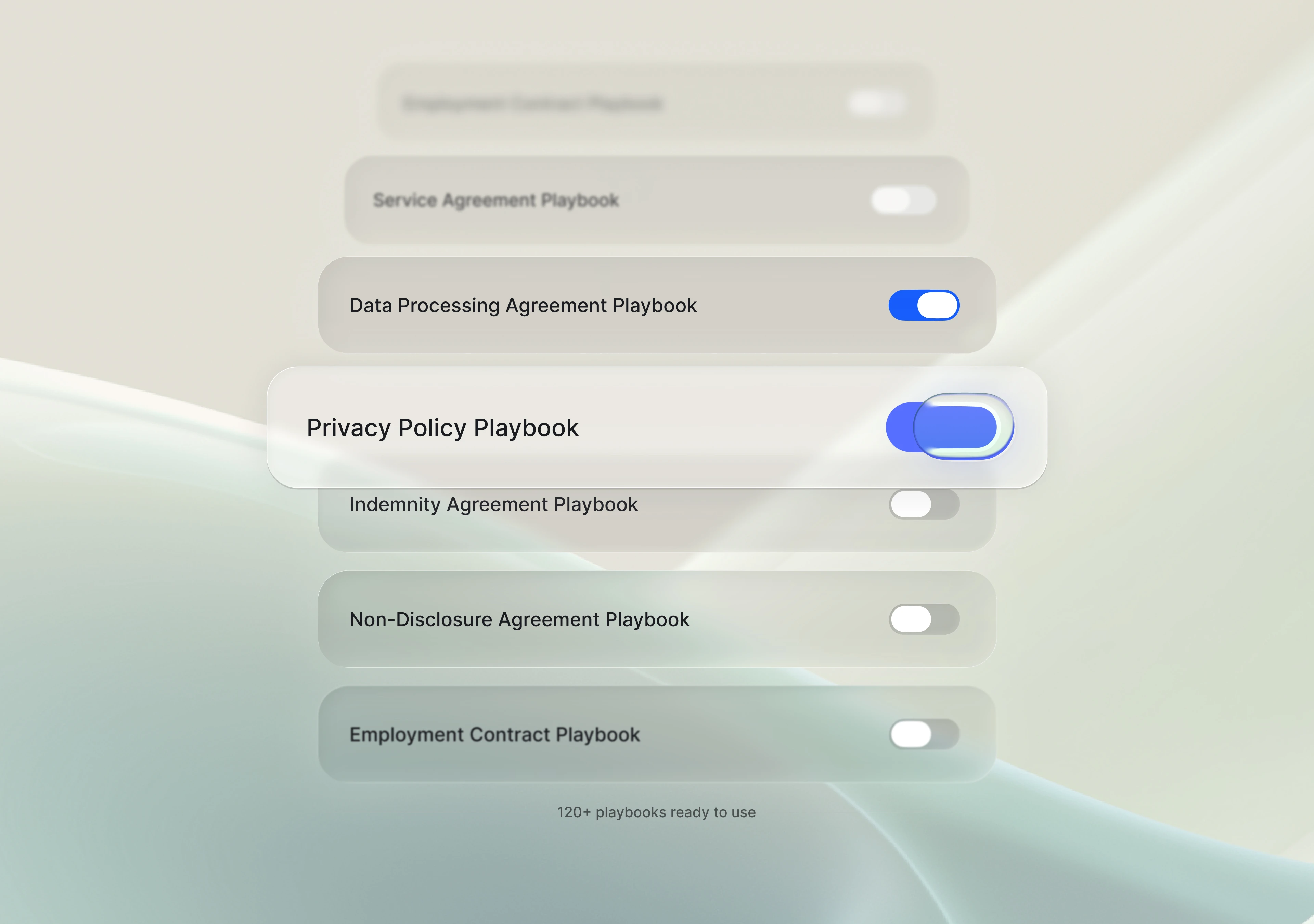
LEGALFLY's playbooks encode preferred positions, risks, and fallback language, and are used to run every review. The platform ships with 120 pre-built playbooks for common contract types, and Playbook Builder converts a reference contract into a working playbook in seconds. Contract review runs through a dedicated Microsoft Word add-in: playbook selection, AI analysis, and tracked changes all happen inside Microsoft Word, reducing a typical two-hour review to around 15 minutes.
Most teams using LEGALFLY cut their contract review time in half within a few weeks of onboarding. Book a short demo to see how it works for your business.
Every suggested edit links back to the playbook rule that produced it. For portfolio-level work, Multi-Review scans contract sets and flags non-compliant agreements.
How to review contracts in 15 minutes instead of two hours
Contract review is where most in-house legal teams lose control of their time. You can't delegate it to business teams without risk. You can't automate it without a legal representative checking the work. So it stays on your desk, and it stays slow.
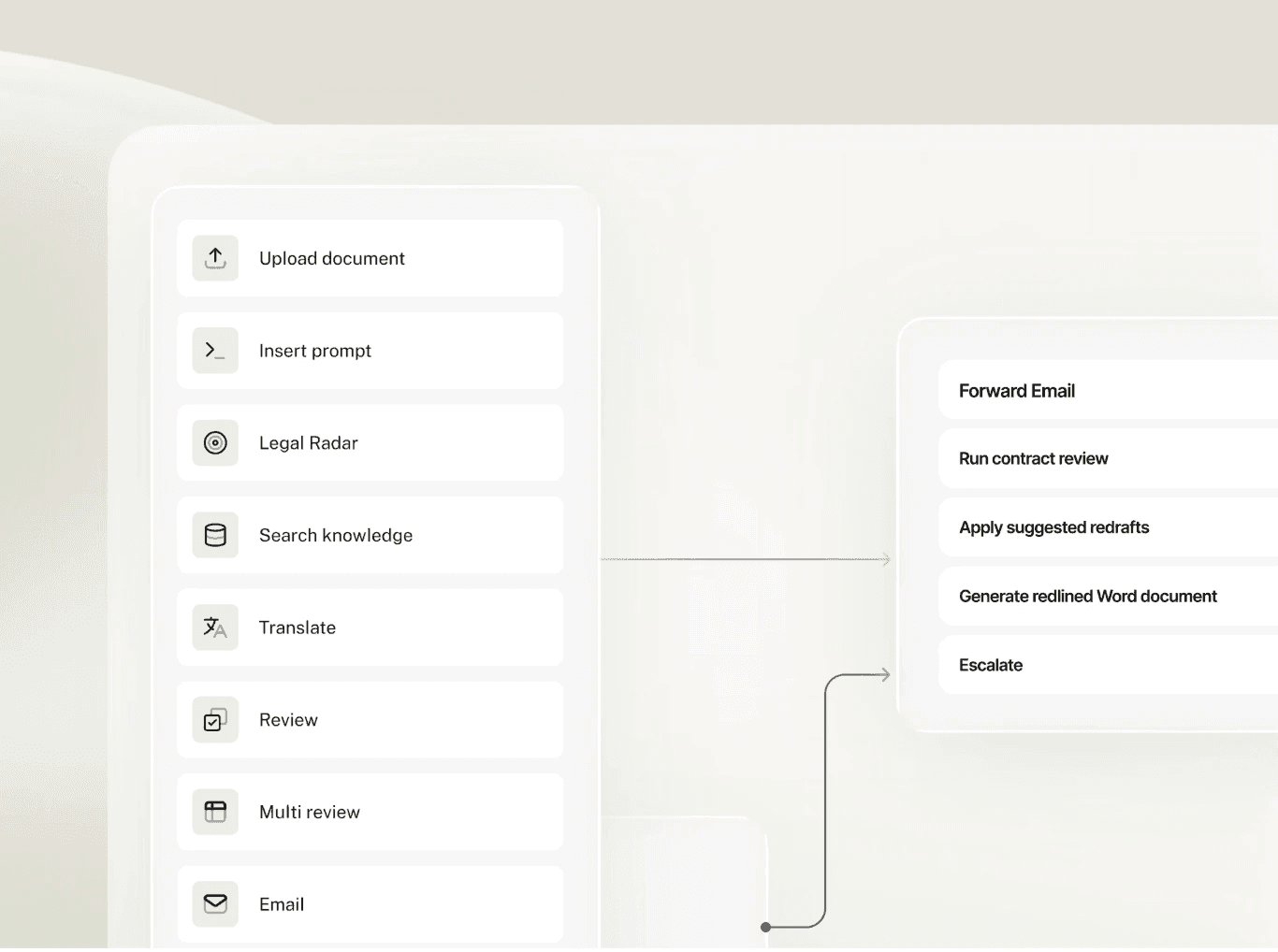
LEGALFLY's Review agent changes that. It runs your contracts through your playbooks automatically, flags deviations with clear reasoning, and returns redlines in Word. You review the suggestions. You make the final call. No black box. No surprise outputs.
Here is how it works, step by step.
Step 1: Connect your document (in Word, or upload to LEGALFLY)
You can start a review two ways. If you're already working in Microsoft Word, open LEGALFLY's Word add-in and trigger a review directly from the document. If you're in LEGALFLY, upload a contract or pull it from SharePoint, Google Drive, or your document repository.
This is where privacy protection happens. LEGALFLY automatically detects and anonymises all sensitive data before any processing: party names, PII, values, and confidential information. The data is re-populated locally in your environment only, so nothing stays in LEGALFLY's systems.
What this does: Your contract data stays protected. You stay compliant.
Step 2: Select your playbook or choose a template
LEGALFLY detects the contract type, jurisdiction, and language automatically when you upload. It then suggests which playbook to apply. You can accept the recommendation, choose a different one, or combine multiple playbooks if the contract needs multiple reviews.
If you don't have a playbook yet, LEGALFLY includes 120+ pre-built playbooks covering 100+ document types. Start with one of those, or let LEGALFLY build a playbook from one of your golden contracts or internal guidelines.
What this does: Every review is assessed against the same standards, no matter which lawyer reviews it or where the contract came from.
Step 3: Run the AI review
LEGALFLY's Review agent runs the contract through your chosen playbook clause by clause. It extracts the key details, identifies the contract type and jurisdiction-specific requirements, and checks every clause against your risk levels, preferred positions, and fallback thresholds.
This happens in seconds. You do not have to read through the whole contract manually first.
What this does: The AI does the first read. You focus on judgment and negotiation.
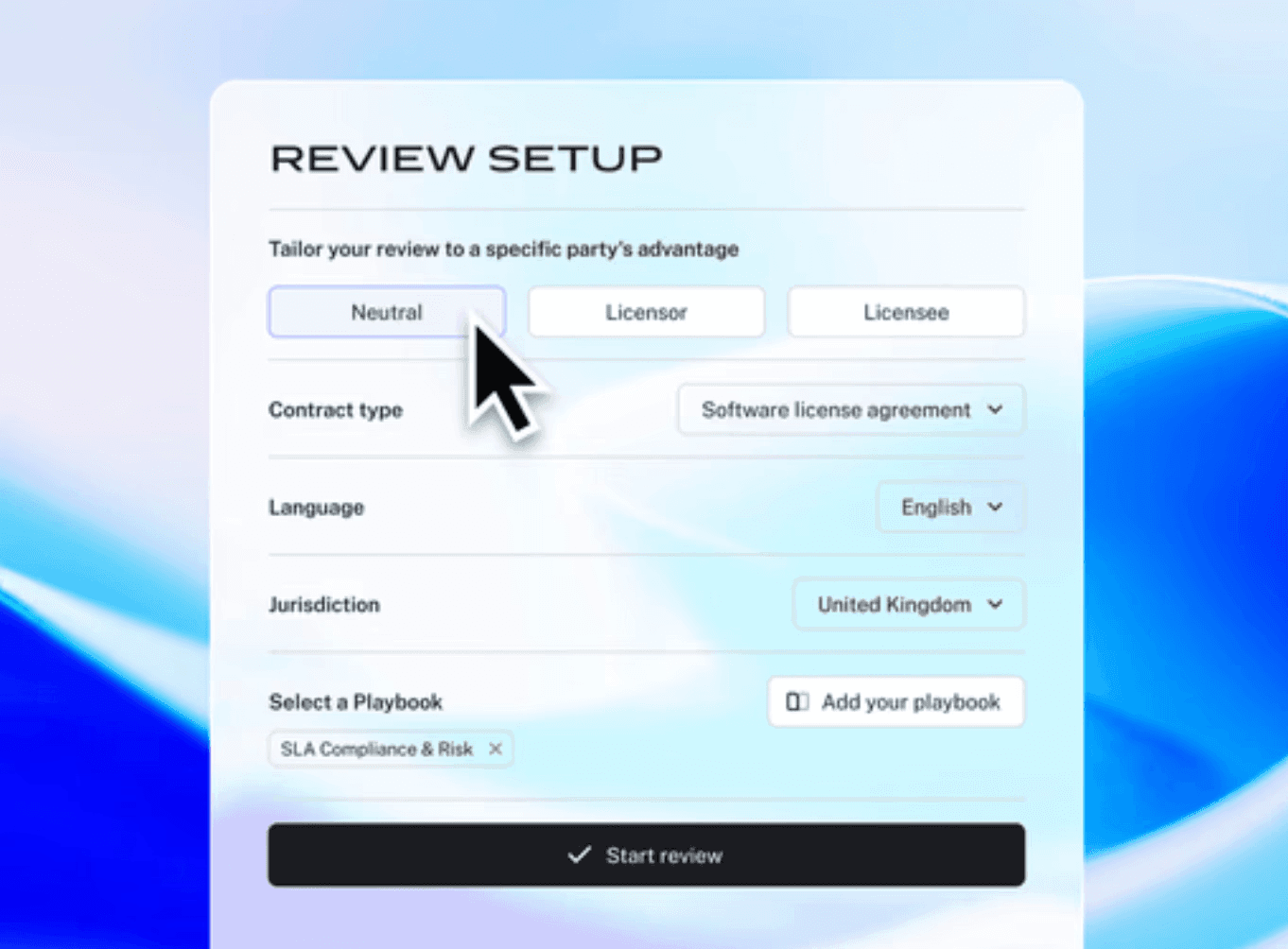
Step 4: Review tracked changes with clear explanations
LEGALFLY returns a fully redlined document in Microsoft Word with tracked changes. Next to every flagged clause or suggested redline, you see the reasoning: which playbook rule triggered the flag, what the deviation was, and what the preferred clause should look like.
You review each change. You can accept it, reject it, edit it, or bulk-apply similar changes across the document. Your edits are also tracked, so there's a complete record of what changed and who made the decision.
What this does: You see why every change was suggested. Nothing gets missed. Your team stays in control.
Step 5: Approve, escalate, or route for self-service
Once you've reviewed the redlines, you approve the contract. If something is above your risk threshold or needs senior counsel sign-off, LEGALFLY escalates it automatically. If this is a standard NDA or low-risk contract, you can route it for approval to procurement or sales, and they get a read-only version with all the explanations included.
Your team sets who can approve what based on contract type, amount, or risk level. A junior lawyer might approve NDAs. A GC might approve only contracts above $2M or those with non-standard liability caps.
What this does: Work moves fast. Business teams get answers. Legal retains control.
Step 6: Export with a full audit trail
Export the reviewed contract as a clean Word document with all changes accepted or as a tracked-changes version for negotiation. LEGALFLY includes a complete audit trail: which playbook was applied, which rules flagged issues, what changes were suggested, what was approved, and who approved it.
That record is ready for internal governance, external audit, or compliance review.
What this does: You have a complete, defensible record. You can answer "why did we flag this?" and "who approved this?" instantly.
LEGALFLY helps your team move faster: less time buried in contracts, more time on the work that actually matters. Book a call to see it in action.
DiliTrust
DiliTrust uses a central Clause Library to compare third-party clauses against company standards, without documented governance, inheritance, or version controls. It does not have a comparable library of pre-built playbooks or clause sets, and teams configure standards, templates, and clauses manually while training the AI on contract-specific concepts.
DiliTrust's Risk Detector compares clauses against the Clause Library and flags potentially non-compliant language, generating compliant alternatives with tracked changes, without linking each edit to a specific rule, rationale, and approval record. It supports extraction, search, and analysis across contract portfolios, without a dedicated multi-document comparison workspace. Editing is supported in Microsoft Word and Google Docs, without an equivalent native review add-in.
DiliTrust vs LEGALFLY for contract drafting
LEGALFLY helps legal teams turn existing agreements into reusable templates and lets the business generate standard contracts within approved guardrails. DiliTrust supports template-based drafting, clause selection, and data population, with more manual configuration.
LEGALFLY
LEGALFLY's Draft agent creates templates and populates them for new agreements, cutting drafting time by around 50%. It automatically converts existing contracts into clean, reusable templates and auto-populates new agreements with the required information.
Self-service drafting runs through legal-approved guardrails, so business teams can generate standard contracts within limits set by legal.
Read more why LEGALFLY is a top-rated legal AI drafting tool.
DiliTrust
DiliTrust lets teams create contracts from pre-approved templates or selected clauses, without an equivalent automated capability for converting existing contracts into templates. It can pre-fill contracts using data from CRM and other connected tools, and uses conditional logic to select clauses and approval paths based on contract type, value, country, or business unit.
See a two-hour review run in around 15 minutes. Book a LEGALFLY demo and we'll show you Review, Draft, and Playbook Builder on your own contract types.
Workflow automation and self-service
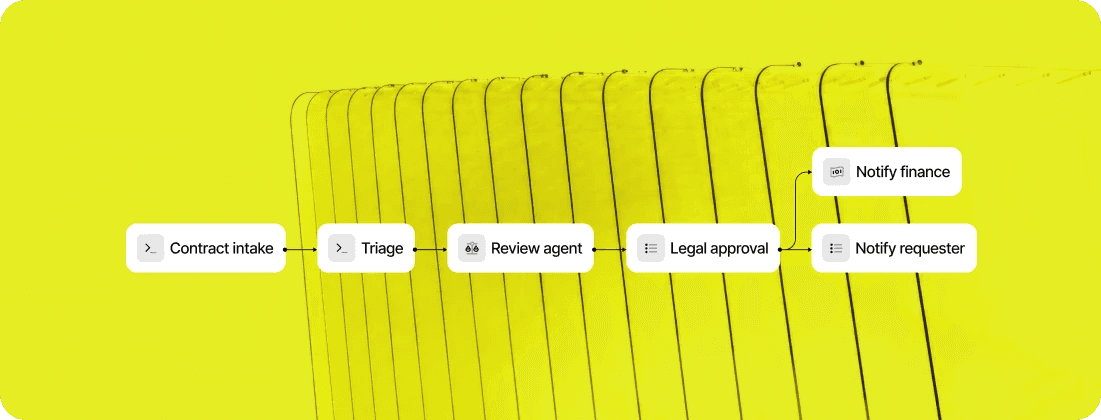
LEGALFLY's Agent Studio reduces the legal work behind each request by using configurable agents to handle intake, review, research, due diligence, and routing before lawyer approval. DiliTrust focuses on structured workflows, matter management, repository control, and end-to-end contract administration.
LEGALFLY
LEGALFLY captures requests through Slack, Microsoft Teams, and email, letting sales, procurement, and HR generate standard contracts within legal-approved limits through the same channels plus the Outlook add-in. Requests route by contract type, department, or risk. Agent Studio lets legal teams build configurable agents for review, research, due diligence, and other recurring legal tasks.
Each workflow can take a request from intake through initial legal analysis and routing, with the lawyer retaining final approval. Review and tracked changes run in Microsoft Word.
See why LEGALFLY is a top legal workflow AI platform.
DiliTrust
DiliTrust's Matter Management module converts incoming emails into structured, traceable requests; native Slack or Microsoft Teams intake is not available. Business users work through guided forms embedded in CRM, ERP, and document-editor workflows. Predefined workflows handle automated routing based on type, value, or risk. DiliTrust uses AI for extraction, summaries, risk detection, and document analysis within configured workflows, with less focus on autonomous execution of substantive legal work. Comments and suggestions are supported in Microsoft Word and Google Docs.
Legal research and regulatory monitoring
LEGALFLY helps you identify what the law says, what has changed, and which contracts are affected through sourced research, regulatory monitoring, and impact analysis. DiliTrust focuses on analysing internal documents and managing remediation once an issue is already known.
LEGALFLY
LEGALFLY's Discovery agent draws answers from 500+ verified legal sources across 110+ jurisdictions, with every answer traceable to the underlying legislation, regulation, or official guidance. Research and multi-document agents also operate alongside company material for internal document Q&A. Legal Radar continuously monitors selected jurisdictions and topics for legislative and regulatory changes, sending automated alerts that summarise relevant changes and organisational impact.
When a change is identified, LEGALFLY automatically searches the repository, flags affected contracts, and produces an impact assessment. Affected contracts move into action workflows.
DiliTrust
DiliTrust has no dedicated external legal-research product or verified legal-source corpus. Lini can search, summarise, translate, and extract insights from documents inside the DiliTrust environment, without equivalent external legal citations. Portfolio search identifies contracts containing relevant clauses or characteristics after a risk or legal issue has been flagged, feeding into workflows for assessment, ownership, implementation, and validation. A central obligations register tracks assigned remediation tasks, deadlines, reporting, and audit trail.
See Discovery and Legal Radar live in your jurisdictions. Book a LEGALFLY demo and we will run a research query and a regulatory alert against sources relevant to your business.
Security, hosting, and data protection
LEGALFLY protects sensitive information by anonymising documents before they reach an AI model and can be deployed on premises. DiliTrust keeps AI processing within its own infrastructure, taking a different approach to data sovereignty and control.
LEGALFLY
LEGALFLY anonymises names, entities, and identifiers before any document reaches an AI model, so sensitive information does not leave your control at any stage. The platform holds ISO 27001 and SOC 2 Type II, supports 80+ languages, and offers on-premises deployment for teams with strict data residency requirements.
DiliTrust
DiliTrust processes decrypted data within its private infrastructure, without no equivalent pre-model anonymisation layer. It uses AES-256, encryption in transit and at rest, identity controls, and granular permissions, and holds ISO 27001, SOC 2 Type II, and ISO 27701.
Hosting is local and sovereign across multiple regions, generally outside the US CLOUD Act except for US clients. Contract AI is trained in eight languages and supports more than 34.
Implementation and time to value
LEGALFLY delivers value quickly. DiliTrust requires a broader implementation across templates, workflows, permissions, integrations, and migrated data.
LEGALFLY
LEGALFLY teams go live within days. The platform ships with 120 pre-built playbooks and automated playbook creation from existing contracts, so initial setup does not require configuring templates and rules from scratch.
DiliTrust
DiliTrust implementations take a few weeks, with formal assessment, mapping, migration, and validation. Configuration covers templates, clauses, conditional rules, fields, workflows, integrations, and permissions.
DiliTrust vs LEGALFLY at a glance
Feature | LEGALFLY | DiliTrust |
USE CASES | ||
Legal research | ✓ 110+ jurisdictions and 500+ legal sources | — |
Case analysis and arguments | ✓ Via custom agents | — |
Contract review | ✓ Web app and Microsoft Word | — |
Contract drafting | ✓ | ✓ |
Due diligence | ✓ Multi-document review, risk flagging and insight extraction | ✓ Secure data room for confidential document sharing during transactions |
Regulatory monitoring | ✓ Proactive legislative and regulatory tracking | — |
Custom legal tasks | ✓ Custom AI agents | — |
DATA SECURITY | ||
Auto-anonymisation | ✓ Always on, before AI processing | — |
Certifications | ISO 27001; SOC 2 Type II | ISO 27001; SOC 2 Type II |
WORKFLOW AUTOMATION | ||
Intake | ✓ | ✓ |
AI triage and routing | ✓ | — |
AI task execution | ✓ | — |
Approval | ✓ | ✓ |
Signature | On roadmap | ✓ Via DocuSign and Adobe Sign |
Sharing and collaboration | ✓ | ✓ |
CONTRACT MANAGEMENT | ||
Document import | ✓ | ✓ |
MCP / SharePoint / Google Drive | ✓ | — |
Contract status and reminders | On roadmap | ✓ |
Which is right for you?
The choice comes down to what you want the platform to do. DiliTrust might be a fit if you need a broader system for matter management, entity governance, board processes, and contract administration.
LEGALFLY is the better choice if your priority is automating substantive legal work, including contract review, drafting, legal research, regulatory monitoring, multi-document review, and agent-led workflows, so your team can handle more without adding headcount.
Use case | Choose | Why? |
In-house legal teams prioritising AI automation | LEGALFLY | Automates contract review, drafting, research, regulatory monitoring and recurring legal workflows. |
Contract review and redlining | LEGALFLY | Applies approved playbooks, returns tracked changes in Microsoft Word and links each edit to the relevant rule. |
Contract drafting and template creation | LEGALFLY | Converts existing agreements into reusable templates and populates new contracts within legal-approved guardrails. |
Matter management | DiliTrust | Has a dedicated module for requests, matters, tasks, documents, deadlines and workload reporting. |
Entity and board management | DiliTrust | Includes dedicated entity management, board portal and secure dataroom modules. |
Cross-departmental self-service | LEGALFLY | Lets sales, procurement and HR submit requests and generate standard contracts through Slack, Teams, email and Outlook. |
Legal research across jurisdictions | LEGALFLY | Discovery searches 500+ verified legal sources across 110+ jurisdictions and returns answers with citations. |
Regulatory monitoring | LEGALFLY | Legal Radar tracks regulatory change, assesses organisational impact and identifies affected contracts. |
Multi-document and portfolio review | LEGALFLY | Multi-Review scans contract portfolios against approved standards and identifies agreements requiring attention. |
Agent-led legal workflows | LEGALFLY | Agent Studio handles intake, initial legal analysis, routing and approval across recurring legal tasks. |
Repository and contract administration | DiliTrust | Provides granular permissions, document storage, version history, metadata search and contract reporting. |
Sensitive legal work | LEGALFLY | Anonymises names, entities and identifiers before documents reach an AI model and supports on-premises deployment. |
Fast implementation | LEGALFLY | Can go live within days using 120 pre-built playbooks and automated playbook creation. |
Reducing legal workload without adding headcount | LEGALFLY | Automates substantive legal work rather than only managing requests, documents and workflow stages. |
Book a LEGALFLY demo and we will walk you through the platform using contract types relevant to your department. Get started.
Note: this information was last updated in Q3 2026. For the most up-to-date view of features, always check with the provider.
Frequently asked questions
What is the main difference between DiliTrust and LEGALFLY?
DiliTrust is a governance suite covering contract lifecycle management, matter management, entity management, and board governance. LEGALFLY is a legal AI platform for contract review, drafting, sourced legal research across 110+ jurisdictions, regulatory monitoring, and agentic workflow automation.
Does DiliTrust offer verified legal research like LEGALFLY's Discovery?
DiliTrust answers questions about documents already inside the platform. Discovery draws answers from 500+ verified legal sources across 110+ jurisdictions, with every answer traceable to legislation, regulation, or official guidance.
Does DiliTrust have a regulatory monitoring feature like Legal Radar?
Legal Radar has no confirmed equivalent on DiliTrust. DiliTrust supports regulatory change management workflows once a change is identified, but a comprehensive external regulatory feed is not confirmed.
Which platform is faster to implement?
LEGALFLY is faster based on the stated timelines. LEGALFLY teams go live within days; DiliTrust implementation takes a few weeks. Actual timelines depend on scope.
How do the two platforms handle contract review?
Both compare clauses against internal standards and suggest edits. LEGALFLY runs each contract against a playbook, returns tracked changes in Microsoft Word, and links every edit to the rule that produced it. DiliTrust's Risk Detector compares clauses against its Clause Library and any configured compliance playbooks.
Is my data safe on either platform?
Both carry ISO 27001 and SOC 2 Type II; DiliTrust also lists ISO 27701. LEGALFLY anonymises names, entities, and identifying information before any document reaches an AI model. Lini runs on DiliTrust's private infrastructure without sharing data with third-party AI providers.
Can the platforms integrate with Microsoft Word?
LEGALFLY has a dedicated Microsoft Word add-in that runs the full review workflow — playbook selection, AI analysis, and tracked changes — inside Microsoft Word. DiliTrust supports proofreading and editing contracts in Microsoft Word and Google Docs; whether this is a native review add-in or works through document synchronisation is unclear.


