







Many in-house teams already use Claude for everyday work, and Claude for Legal now extends it into legal-specific tasks like contract review and research.
This blog looks at what Claude for Legal covers out of the box, what sits behind the more technical open-source layer. It also covers whether LEGALFLY, with its guardrailed workflows, collaboration beyond legal, and support for rollout inside the business, is better for in-house teams.
See LEGALFLY on your own legal documents. Book a demo, and we will tailor it to your contract types and jurisdictions.
What is LEGALFLY?
LEGALFLY is a legal operating system built for in-house legal professionals at enterprises. It comes with implementation and support from legal and engineering experts.
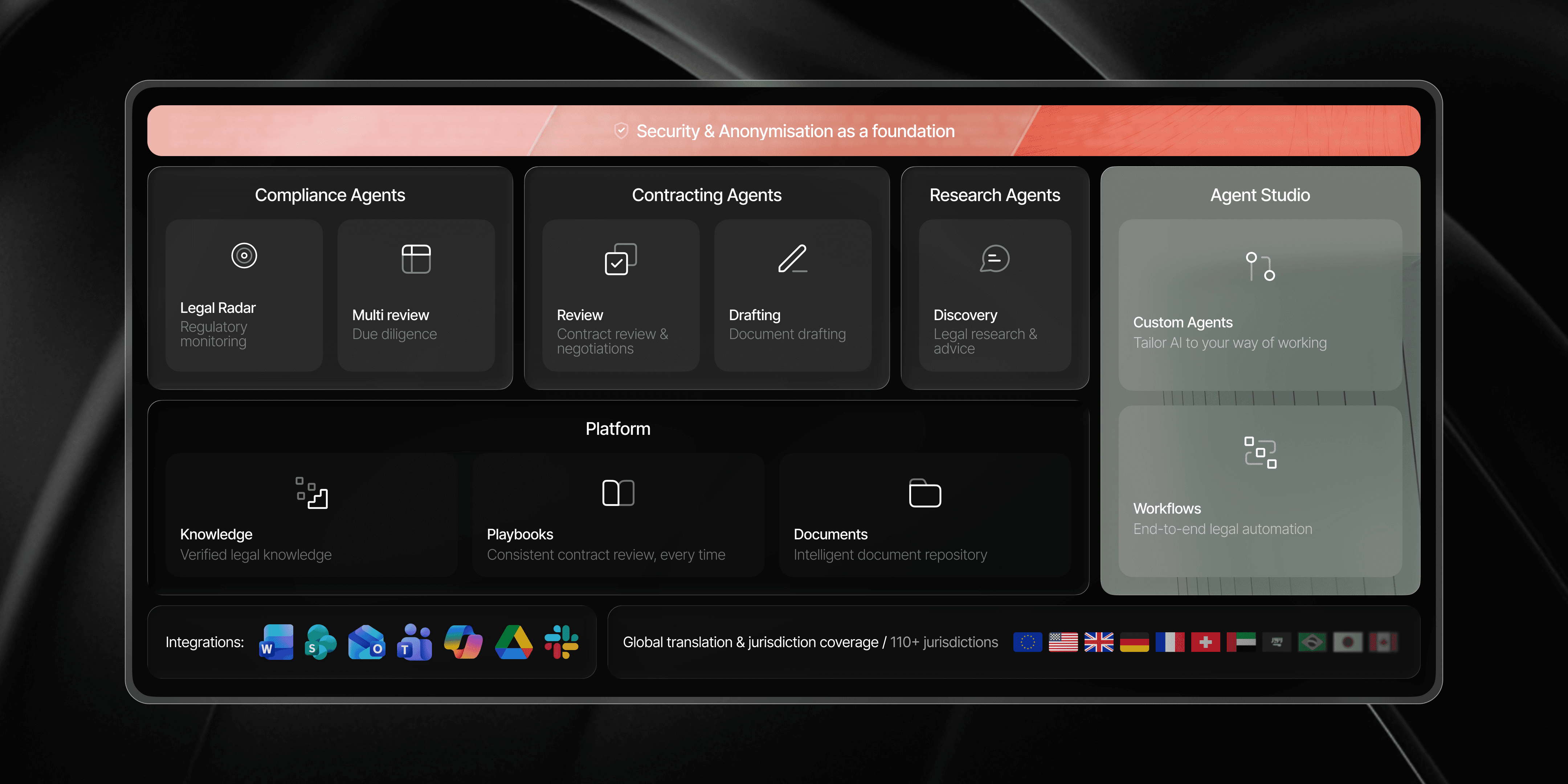
Contract review, drafting, legal research, regulatory monitoring, multi-document review, and workflow automation can all be done in one platform, with data anonymisation, enterprise integrations, and lawyer sign-off built in. Teams at the European Commission, SAP, Lufthansa, AXA, and Bosch use it to review a contract in about 15 minutes and stay ahead of regulatory change.
Setup, implementation and time to value
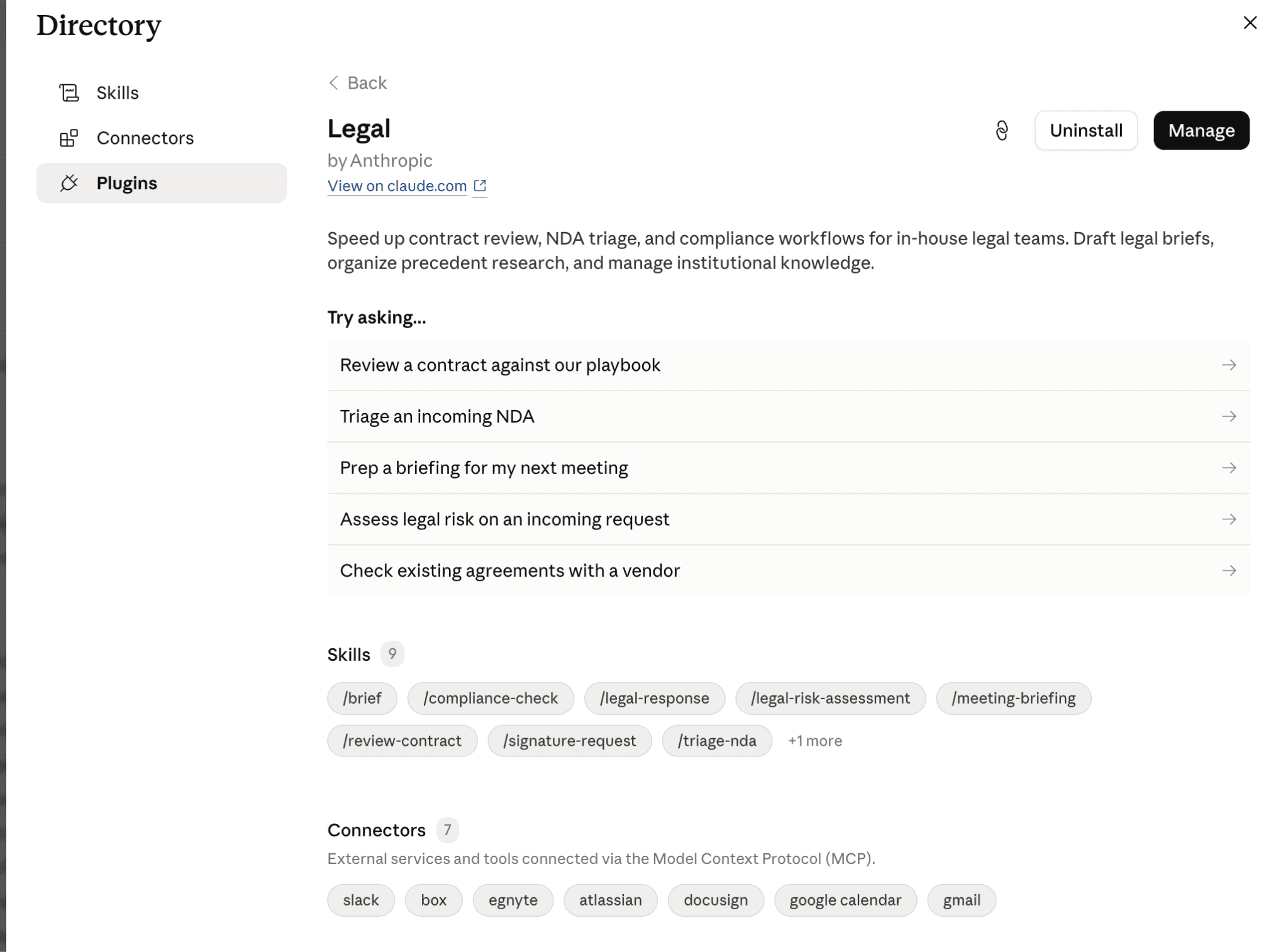
Claude for Legal is quick at the standard-plugin level: install from the directory, connect Slack or Gmail, and start using the nine legal skills. For anything beyond those, the effort rises sharply. Installing an open-source plugin means pulling it from GitHub, running its setup interview, supplying seed documents, and authorising the connectors each plugin depends on.
LEGALFLY is live in days. Legally trained specialists work with you to build your playbooks and your AI workflows, taking you through training and implementation. It comes with 120 pre-built playbooks for common contract types, and Playbook Builder turns your existing golden contracts into a working playbook in seconds. Onboarding is built around the contract types you already handle in volume, and the Microsoft Word add-in leaves your team's existing habits in place. The configuration Claude for Legal asks of you is, for the most part, already done.
Most teams using LEGALFLY cut their contract review time in half within a few weeks of onboarding. Book a short demo to see how it works for your business.
Which platform is better for in-house legal teams?
Both platforms cover a wide range of legal work. But is that breadth focused on in-house needs, or do you have to select the parts that apply?
Claude for Legal's coverage is split across separate plugins for separate audiences, including litigation, corporate, employment, privacy, and so on, plus plugins for law students and university clinics, all in one catalogue. An in-house team installs the plugins it needs and leaves the rest. That suits an organisation with many kinds of legal needs, and it means part of onboarding is deciding which plugins apply to you.
LEGALFLY is focused on in-house work. Contract review, drafting or creating a first draft, research, regulatory monitoring, and workflow automation are the platform itself, shaped by how a legal department operates rather than by a law firm's billable model or a clinic's teaching remit. There is nothing to filter down to your use case, because in-house work is what the platform is built for.
Legal research and citations: LEGALFLY Discovery vs Claude connectors
Is verified legal research built into the platform or added through external tools?
Claude for Legal's research capability comes largely from connectors. You connect a research tool first, because without one the citations go unverified, and any answer relying on the model's own knowledge is flagged for manual checking. The primary connector is Thomson Reuters CoCounsel, which brings Westlaw Deep Research inside Claude with full citations. It needs a separate CoCounsel subscription with the connector enabled.
LEGALFLY's Discovery agent uses retrieval-augmented generation grounded in 500+ verified legal sources across 110+ jurisdictions, and every answer traces back to the specific clause or paragraph that supports it.
Ask whether an obligation applies across five European markets, and the answer returns sourced and citable, with no separate research platform to license and connect.
Contract review and redlining
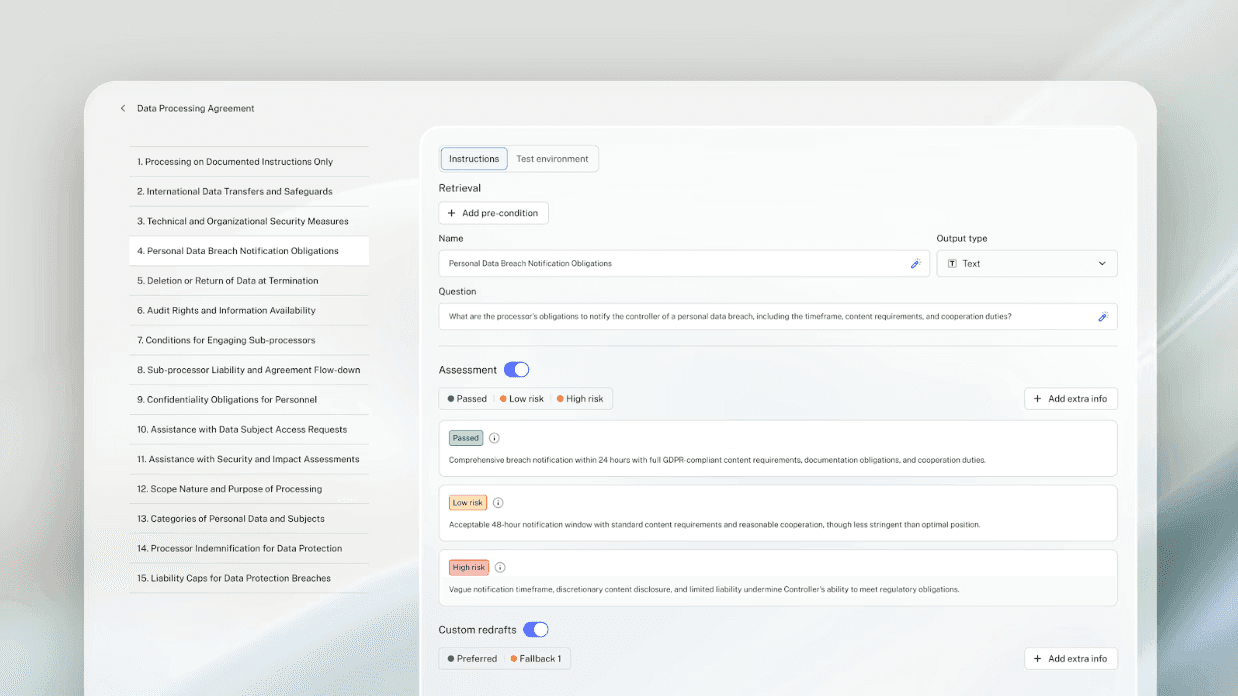
Claude for Legal's standard /review-contract skill gives you the review framework but you author the playbook (check items, approved clauses, fallbacks) for each contract type during setup.
LEGALFLY's contract review runs against a playbook enforced across every review. It flags risks, such as a liability cap that is too low, a payment term outside your fallback position, and suggests or applies redlines based on your preferred fallback clauses. Every suggestion returns in Microsoft Word as a tracked change tied to the specific playbook rule that triggered it, so you see not only what changed but why.
LEGALFLY helps your team move faster: less time buried in contracts, more time on the work that actually matters. Book a call to see it in action.
Contract review workflow with LEGALFLY step-by-step
Building a workflow in LEGALFLY means configuring five core elements: where requests come from, how they get sorted, what work runs on them, who approves them, and how the rules evolve. You don't need legal tech expertise. If you can define a process using your existing playbooks, routing rules, and approval sign-offs, you can build a workflow in Agent Studio.
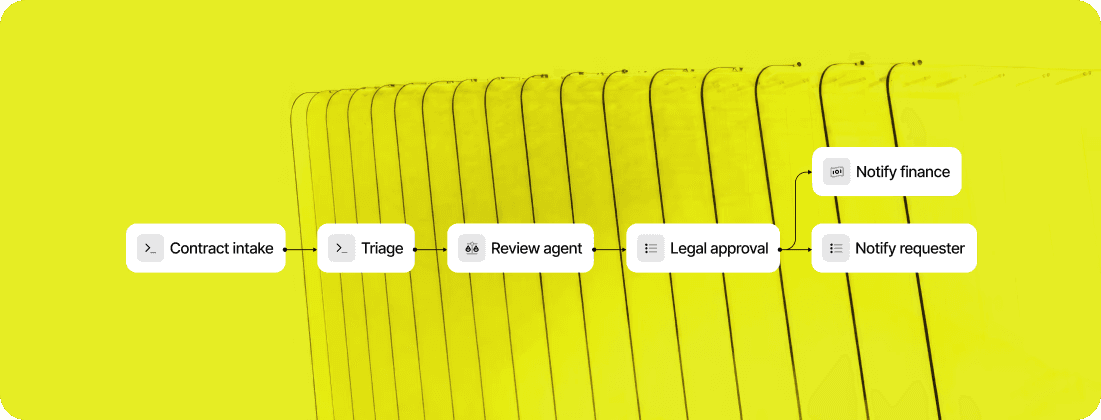
See why LEGALFLY is a top contract review software using AI. Here's how it works, step by step.
Step 1: Define where requests enter
Your legal team receives contract review requests from sales, procurement, HR, and sometimes from external counsel. Every request probably lives in a different channel right now, Slack, email, SharePoint, Teams, even Outlook.
Agent Studio captures all of those. You connect the channels you actually use, Slack, Microsoft Teams, or email. From that moment on, every request flows into LEGALFLY automatically. No more chasing sales for the contract or digging through email to find that procurement vendor agreement.
What this does: Business teams stay in the tools they know. Your team sees everything in one place.
Step 2: Configure triage logic
Not all contracts follow the same path. An NDA for a small tech partner needs a single review. A large supplier agreement that locks in pricing for three years needs legal, procurement, and risk review.
Agent Studio lets you build rules that route contracts by type, department, jurisdiction, or risk level. You can also split a single contract across multiple reviewers if different stakeholders need to weigh in.
LEGALFLY detects the contract type, jurisdiction, and language automatically when the request arrives. You tell it what to do with that information.
What this does: Every contract finds the right review path without manual handoff. A reviewer in Singapore sees a different workflow for a China-jurisdiction employment contract than a London reviewer does for a UK supplier agreement.
Step 3: Assign agents to the workflow
Once a contract is triaged, Agent Studio runs the work. You configure which agents handle which step.
A contract review agent runs the contract through your approved playbooks and flags risks. A research agent (Discovery) pulls jurisdiction-specific requirements and checks regulatory change. A draft agent converts your templates into populated agreements. Custom agents can do anything your team builds.
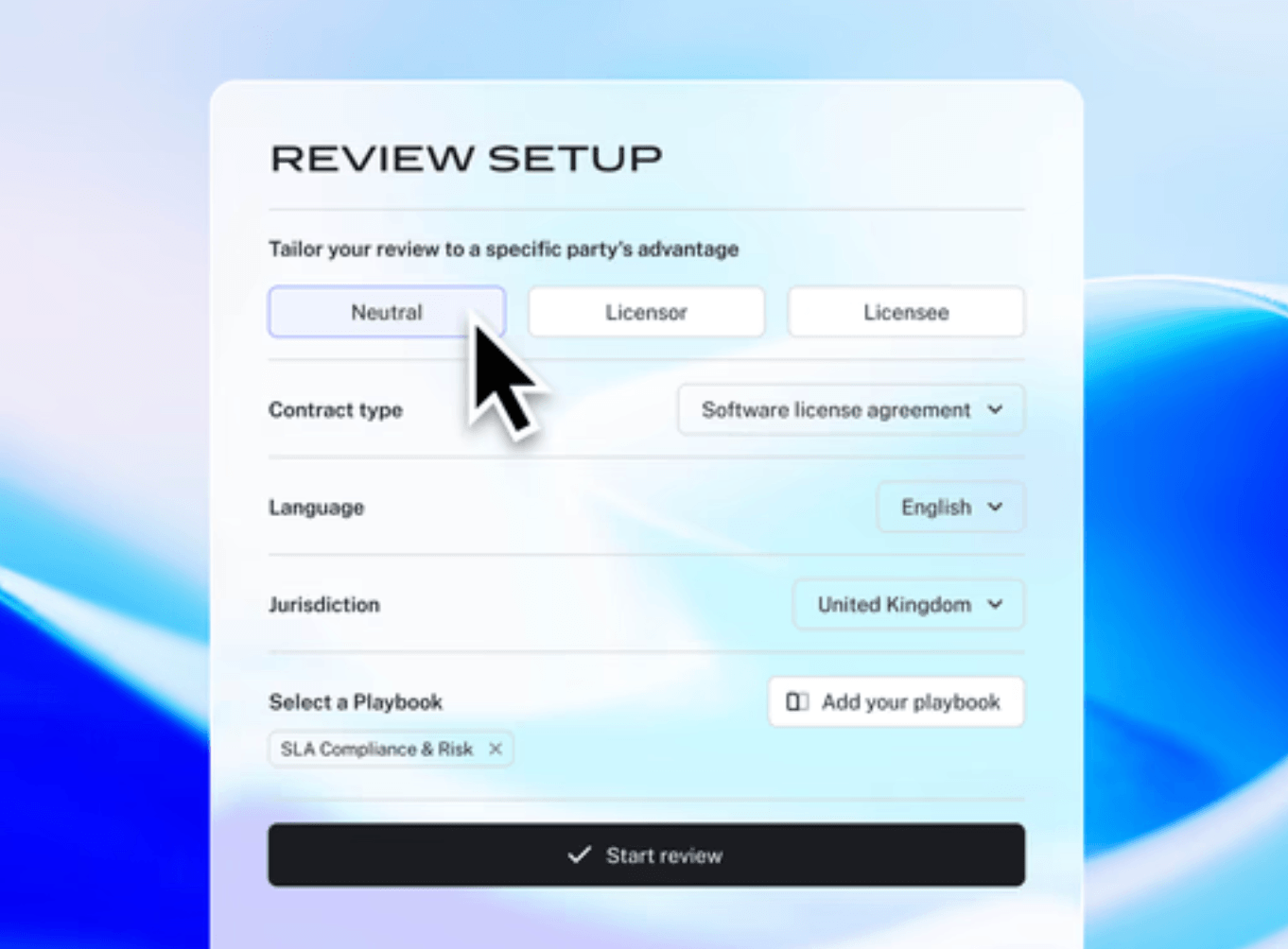
You choose which agents run, in what order, and under what conditions. If a contract exceeds a risk threshold, you can skip certain steps or escalate to senior counsel automatically.
What this does: LEGALFLY does the analysis work at speed and scale, so your team focuses on judgment and negotiation.
Step 4: Set approval and notification rules
A workflow needs a human decision point. Agent Studio puts that front and center.
When agents complete their work, results land in LEGALFLY for review. You set who gets notified, when, and through which channel. A junior lawyer might review and approve routine NDAs. A General Counsel might review only contracts above $2M or those with non-standard liability caps.
Notifications go to the right person at the right time. A sales contract that's ready for approval hits your Slack. If 48 hours pass and it's not approved, an escalation reminder goes to your GC.
What this does: Work keeps moving, and nothing falls through the cracks.
Step 5: Execute and refine
Once your workflow is live, LEGALFLY handles the coordination. Requests arrive, get triaged, get reviewed by agents, and get approved. Your team works through a consistent pipeline.
But workflows evolve. When a new jurisdiction opens, you update the triage rules. When a playbook gets stricter, you update the review logic. LEGALFLY applies those changes centrally, so every request from that moment on follows the new standards.
What this does: Your playbooks and workflows stay aligned with your actual business needs.
Multi-document contract review at scale
Reviewing one contract is useful. Identifying the same risk across 50 or 500 agreements is a different task.
LEGALFLY's Multi-Review agent is built for this scale. It scans contract portfolios against your approved standards, flags agreements that do not meet them, and gives legal teams a faster way to assess exposure during regulatory change, due diligence, policy updates, or large-scale remediation. Ask for the change-of-control clause across 50 leases and the answer returns as a structured, comparable output, not a chat log.
Claude for Legal can analyse groups of documents through configured agents and connected repositories, but a portfolio-review workflow does not arrive by default. The standard plugin runs multi-document work inside a personal chat session, where output format, structure, and interface depend on the skill or prompt each user configures.
Your team must define the review criteria, build the process, and decide how results are structured, stored, and escalated.
Extracting facts from claims and unstructured documents
Claims and litigation documents contain the facts a legal team needs - dates, amounts, breach events, notice periods - buried in unstructured text.
LEGALFLY is specifically trained to extract that structured data from unstructured claims documents, so the facts a legal team needs to build a case land in a usable form rather than a summary.
Claude for Legal can summarise and correlate facts across claim documents in a single session, but structured extraction relies on how a plugin or prompt is configured, and results in the standard plugin live inside the chat where they were produced.
Legal workflow automation and self-service
As a GC, a large part of your week probably goes to coordination rather than legal judgment: taking requests from sales, procurement, and HR, routing them, chasing stakeholders, and tracking status.
LEGALFLY's Agent Studio automates that. Business teams can raise requests through the channels they already use, including Slack, Microsoft Teams, and email. LEGALFLY captures each one, routes it by contract type, department, or risk, runs the initial work through agents configured to your standards, and returns a reviewed output for your approval.
Those same guardrails extend to drafting: LEGALFLY's Draft agent converts your existing contracts into clean templates and auto-populates them with the correct information for a new agreement, cutting drafting time by around half. Procurement, sales, and HR can generate standard contracts themselves within limits legal has already set, which cuts the volume of routine requests reaching senior lawyers.
Claude for Legal automates through scheduled and named agents that your team deploys and maintains, and it connects to Slack and Teams for intake. Standing them up and governing them is down to you.
Book a LEGALFLY demo and we will show you Agent Studio taking a request from intake to approval, with your team keeping sign-off at every step.
Regulatory monitoring: Legal Radar vs Claude agents
How the two platforms differ here matters for in-house teams working across jurisdictions.
With LEGALFLY's Legal Radar, you set the topics and jurisdictions that matter to you. When something relevant changes, you receive an automated alert that summarises it and assesses how it affects your organisation. Legal Radar then searches your document repository and identifies which of your contracts the change touches, so you know exactly where to act. It supports 80+ languages.
Claude for Legal needs a scheduled agent: a regulatory-feed monitor you deploy, run on a set cadence, and govern with a materiality filter of your own. It generates the digest, and it is a workflow your team configures and maintains.
Security, data handling and deployment
LEGALFLY anonymises sensitive data at the point of ingestion. It automatically detects and tokenises PII, party names, and contract values before anything reaches an AI model, and re-populates the data locally in your environment. That layer applies across every workflow, user, and document by default. LEGALFLY holds ISO 27001 and SOC 2 Type II certifications, and offers on-premises deployment for teams with strict data-residency requirements.
With Claude for Legal, security depends on how you run it. Anthropic maintains its own enterprise data protections, and its policy is not to train public models on customer data by default, but sensitive information such as PII, party names, and deal terms reaches the model unmodified unless you configure a stripping step yourself.
Anthropic's guidance directs teams under strict confidentiality obligations to local deployment and a data-protection-officer review before they proceed.
Ongoing maintenance and governance
Claude for Legal is, by design, an ecosystem. Alongside the first-party plugins runs a community skill marketplace, and Anthropic is candid that no one certifies those community skills. That means a lawyer who installs one is running code that can access matter files, the practice profile, and research connectors. A builder hub adds a trust layer to contain that risk. Between community skills, subscription connectors, and per-plugin setup, a substantial share of the platform is yours to maintain.
LEGALFLY is one vendor with one support line. Playbooks, integrations, research sources, and the anonymisation layer come from a single place and are maintained by a single team. Agents, workflows, playbooks, and outputs are shared across the legal team, so every lawyer works from the same standards, sees the same pipeline, and contributes to a centralised knowledge base visible and governed at department level.
Every suggested edit returns in Word as a tracked change tied to the specific playbook rule that triggered it, and the final export carries a complete record of what changed, which rule applied, and who approved it, ready for internal governance or external audit.
A custom LEGALFLY agent is available to every lawyer in the department the moment it's created. A Claude skill lives in the installing user's own environment until someone manually shares or replicates it. Enterprise-ready collaboration and version history on every playbook come as standard.
What is Claude for Legal?
Claude for Legal is Anthropic's legal offering, launched in 2026 and built on the Claude models. It comes in two forms. The first is the standard Legal plugin inside Claude, offering nine ready-made skills that cover common legal tasks: contract review against a playbook, NDA triage, compliance checks, legal risk assessment, briefings, templated legal responses, vendor status checks, and signature requests. It connects to Slack, Box, Egnyte, Atlassian, DocuSign, Google Calendar, and Gmail. This is what most teams see first, and it installs in a couple of clicks.
The second is Anthropic's open-source Claude for Legal repository, a wider catalogue of practice-area plugins covering commercial, corporate, employment, privacy, IP, litigation, regulatory, and AI governance work, alongside plugins for law students and university clinics. With this deeper layer, your team pulls plugins from GitHub, runs a setup interview per plugin, and connects the systems each one relies on. Getting value from it takes legal tech knowledge and someone to configure and maintain it. Learn more here.
Claude for Legal vs LEGALFLY at a glance
The table below compares LEGALFLY with the standard Claude Legal plugin.
Category | Claude for Legal | LEGALFLY |
Best for | Individual lawyers handling routine tasks | In-house teams needing a ready-to-use legal platform |
Contract review | Redlines against a customer-authored playbook | 120 pre-built playbooks, tracked changes and rule-level explanations |
Multi-document review | No dedicated workflow | Multi-Review scans 50+ contracts and flags issues |
Drafting | Chat drafting and templated responses | Draft agent creates populated templates from existing contracts |
Legal research | No built-in verified research | 500+ verified sources across 110+ jurisdictions, with source citations |
Fact extraction | Chat-based summaries | Extracts dates, amounts and breach events |
Regulatory monitoring | Not included | Legal Radar tracks changes and affected contracts |
Workflow automation | Not included | Agent Studio manages intake, routing, work and approvals |
Self-service | Not included | Business teams generate contracts within legal-approved guardrails |
Business intake | Connectors for Slack, Gmail, DocuSign and other tools | Requests through Slack, Microsoft Teams and email |
Output consistency | Depends on prompts and skill configuration | Standardised outputs linked to playbook rules |
Collaboration | Skills must be shared or redeployed | Agents, workflows and playbooks are shared department-wide |
Setup | Quick installation; customer configures playbooks and skills | Live within days with 120 playbooks and implementation support |
Security | Enterprise protections; anonymisation requires configuration | Automatic anonymisation before AI processing |
Maintenance | Customer maintains prompts and playbooks | One vendor manages the platform, integrations and playbooks |
Which is right for your legal team?
For most in-house legal departments, LEGALFLY is the closer fit. Claude for Legal asks you to build once you step past the standard plugin: choose the open-source plugins, run a setup interview for each, license and configure your own connectors, and take on a community ecosystem you have to govern.
LEGALFLY brings contract review, drafting, multi-document review, research, regulatory monitoring, and workflow automation into one platform built for in-house counsel, with a team of legally trained specialists working alongside you to set it up, and no technical knowledge needed on your side.
Claude for Legal is your personal productivity tool. LEGALFLY is your legal associate for your whole team.
Book a LEGALFLY demo, and we will walk you through the platform on the contract types your department handles every week.
Note: this information was last updated in Q3 2026. For the most up-to-date view of features, always check with the provider.
Frequently asked questions
What is the difference between LEGALFLY and Claude for Legal?
Claude for Legal comes in two forms: a standard Legal plugin with nine ready-made skills for everyday legal tasks, and a wider open-source repository of practice-area plugins that a technical team installs and configures. LEGALFLY is a single platform built specifically for in-house counsel, with contract review, research, regulatory monitoring, and workflow automation already assembled and ready to use.
Is Claude for Legal built for in-house legal teams specifically?
No. Claude for Legal serves law firms, in-house departments, solo practitioners, and law students and clinics from the same catalogue of plugins. LEGALFLY is built for one audience: in-house counsel at enterprises.
Does Claude for Legal require setup before use?
The standard Legal plugin installs in a couple of clicks. Going beyond it requires the open-source plugins, each with a 10-to-20-minute cold-start interview, and most research and system connectors are separate subscriptions you configure yourself. Anthropic's documentation says that skipping the setup interview is the most common reason a plugin produces generic output.
How long does it take to get LEGALFLY running?
LEGALFLY is live within days, and a team of legal engineers is available to help you at every step. It includes 120 pre-built playbooks for common contract types, and Playbook Builder generates a working playbook from your existing contracts in seconds, so most of the configuration Claude for Legal requires is already done.
Does LEGALFLY anonymise data before AI processing?
Yes. LEGALFLY converts names, entities, and identifiers into tokens at the point of ingestion, before any AI model processes the document. This anonymisation layer applies by default across every workflow, user, and document, and Claude for Legal's documentation describes no equivalent layer.
Which is better for in-house legal teams, LEGALFLY or Claude for Legal?
For most in-house legal departments, LEGALFLY is the closer fit, because it arrives as one working platform rather than a set of plugins to assemble. Claude for Legal suits teams with the engineering resources to configure and govern a more open, customisable system themselves.


