





For most in-house legal teams, the bottleneck is not expertise. It's that contract review, drafting, and checking still happen manually—leaving queues, version chaos, and risk blind spots. When volume grows faster than headcount, legal becomes a constraint on revenue. AI is changing this. Modern contract review tools now analyse, flag, and redraft documents in minutes instead of hours, and do it consistently against your standards.
LEGALFLY is purpose-built for in-house legal teams. It handles review, drafting, compliance checking, and comparison in one platform—all inside Microsoft Word, SharePoint, Teams, Outlook, Slack, and Google Drive. Every document is anonymised before any AI processing begins, so confidential data stays protected.
Your team stays in control. This guide walks through exactly how LEGALFLY works, step by step.
Note: If your team is spending hours on document work that should take minutes,book a demo. We will show you how LEGALFLY speeds up contract review by 87%, drafting, and compliance inside the tools you already use.
How LEGALFLY handles legal document review
LEGALFLY structures contract review into a consistent five-step process: select your document set, choose the playbook, run the AI review, compare clauses, and generate a report. Every review follows the same sequence, regardless of who runs it or how many documents are in the queue.
Step 1: Bring the document in
Pull the document directly from SharePoint or Google Drive, open it in Microsoft Word, or trigger a review directly from Teams, Outlook or Slack. Sensitive data and confidential information is anonymised automatically before any AI processing begins, no manual redaction required. The platform detects the contract type, jurisdiction, language, and party roles so every review starts with the right context.
Step 2: Select a playbook
Choose which playbook to apply. LEGALFLY includes 120+ pre-built playbooks covering 100+ document types. If your team has built playbooks based on your own standards, select those instead. The playbook defines what to check, the risk level for each clause, and what acceptable positions look like.
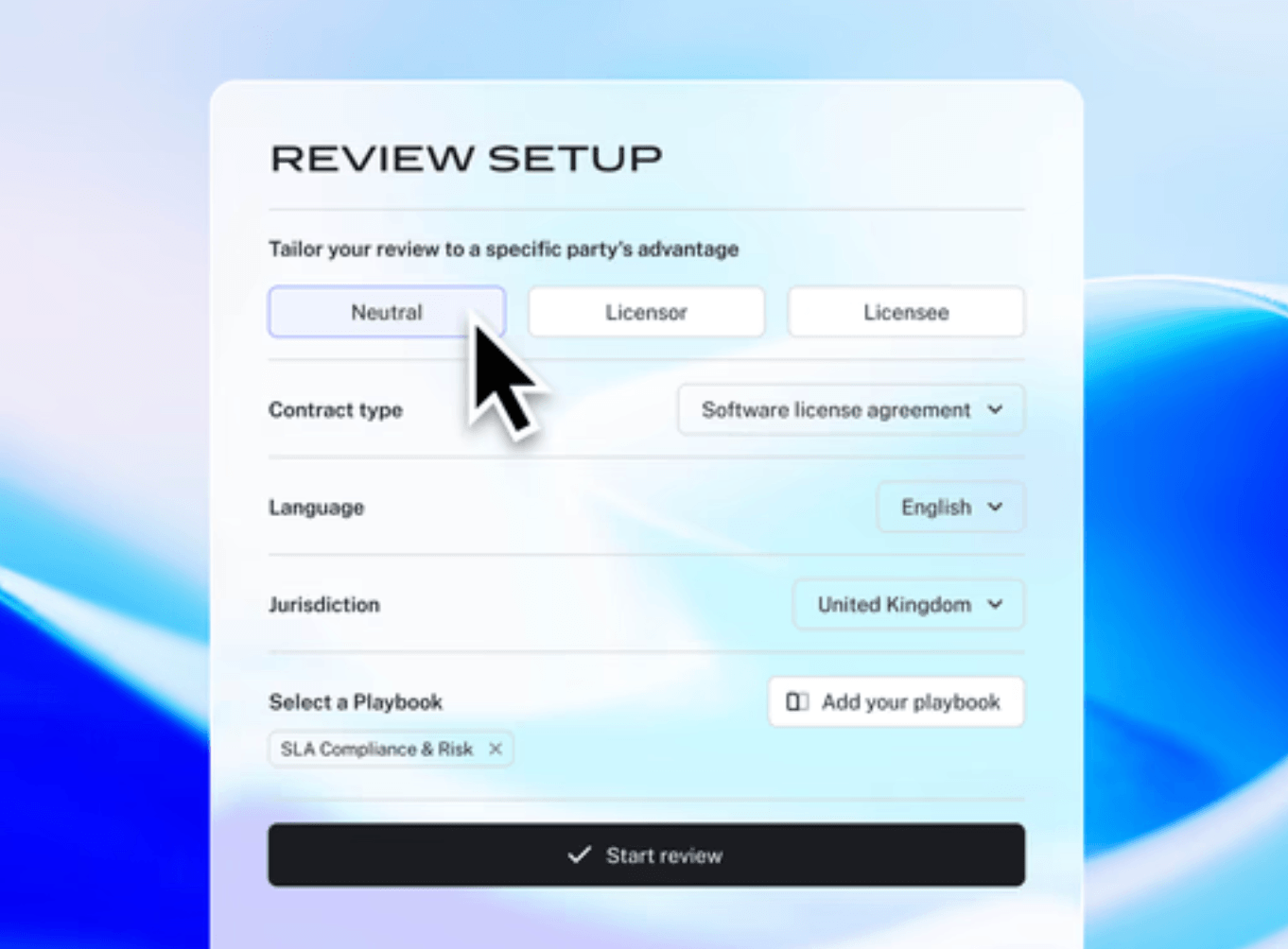
Step 3: Run the AI review
LEGALFLY analyses the document clause by clause. It flags legal and business risks, identifies missing obligations, and compares language against your preferred positions. For each issue, it returns a plain English explanation so your team understands the risk before deciding how to act. Every legal AI output is traceable back to the specific clause and standard it checked against.
Step 4: Compare clauses
Any clause outside your standards is shown alongside your preferred wording. You accept, reject, or edit each suggestion. The platform explains each change, so the legal reasoning behind every redline is visible. Final judgment stays with your team.
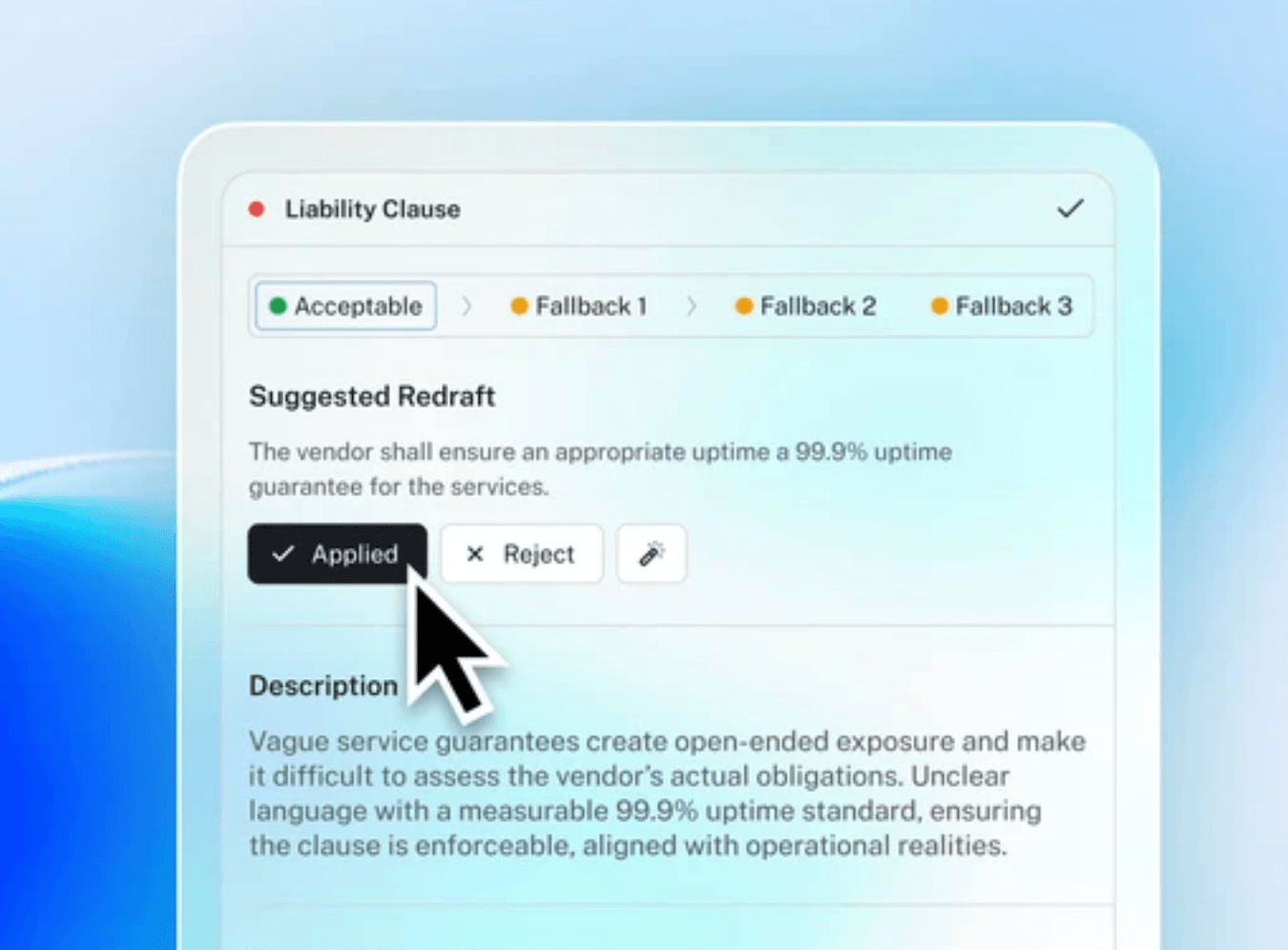
Step 5: Generate a report
LEGALFLY produces an audit-ready report documenting what was checked, what was flagged, and what was resolved. Every document review is traceable and explainable. Review time drops from two hours to fifteen minutes.
Most teams using LEGALFLY cut their contract review time in half within a few weeks of onboarding. Book a short demo to see how it works for your business.
Automated workflows for handling legal documents
Once deviations are flagged, you need them routed, reviewed, and acted on consistently. That's where Agent Studio comes in.
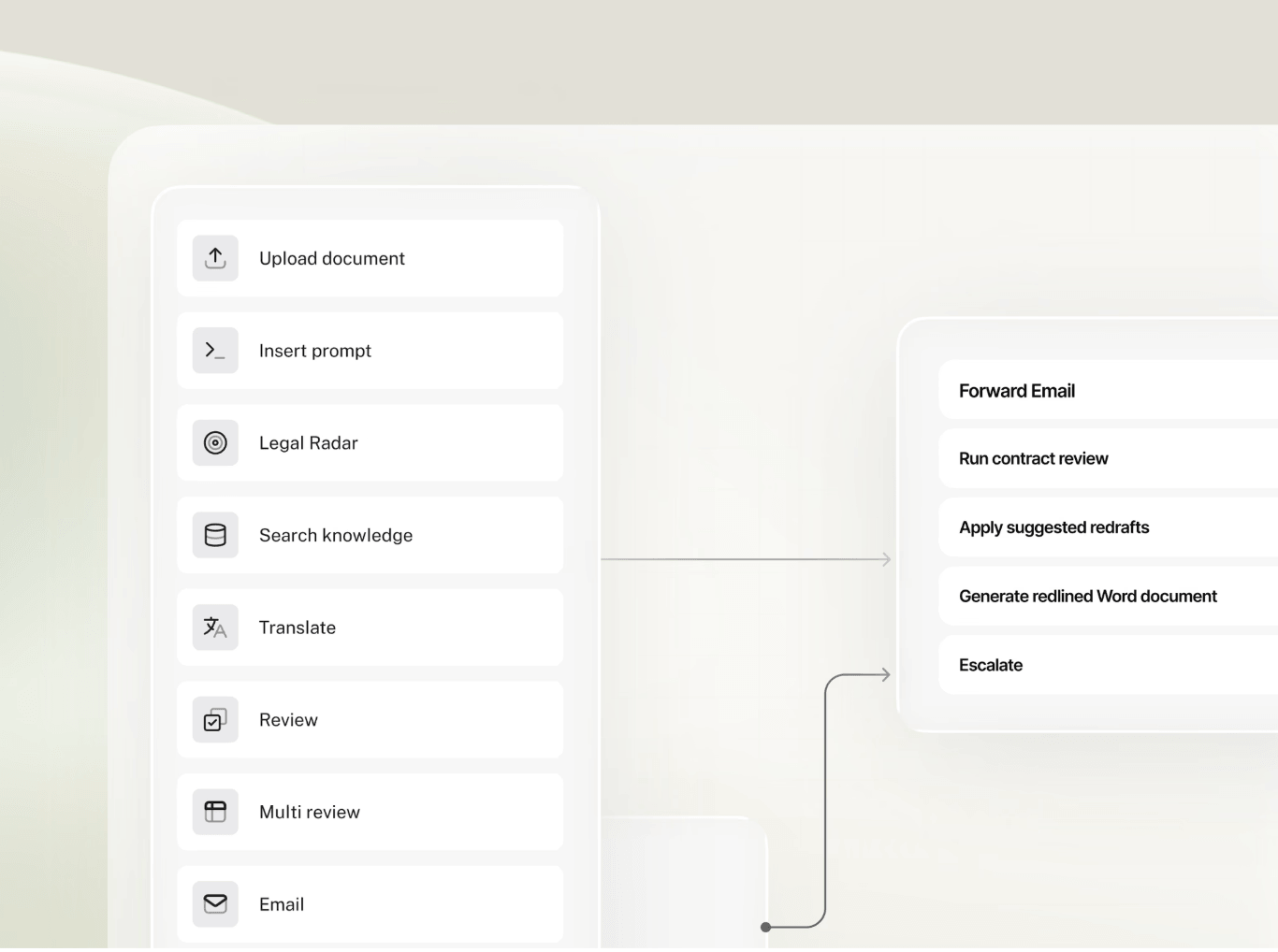
Agent Studio automates entire legal workflows from intake to approval, so contract review doesn't stop at flagging differences. Set up conditional logic that automatically routes third-party agreements to the right reviewer based on contract value, counterparty, or risk profile. When a deviation is flagged, the workflow triggers the next step automatically: escalation to a senior lawyer, notification to procurement, or conditional approval if the change falls within acceptable thresholds.
Your legal team stays in control. You set approval and review steps where decisions are needed. But the routine work, the routing, the follow-ups, and the notifications happen automatically. Nothing falls through the cracks, and every decision is logged for compliance and audit purposes.
For teams handling large volumes of third-party paper, this transforms comparison from a manual task into a governed process that scales without adding headcount.
Read more: Everything you need to know about agentic AI for legal work
How playbooks for legal documents work
Playbooks are what make consistent, scalable document review possible. Without them, review quality depends on whoever happens to be available. With them, every document gets checked against the same standards, whether your team is reviewing one contract or a hundred.
Building a playbook from your existing contracts
LEGALFLY's Playbook Builder takes your golden contracts and generates a first draft of a playbook in approximately two minutes. It identifies clause structures, patterns, and risk areas automatically. You refine it from there: set risk thresholds, define preferred language for each clause, add fallback positions for negotiation, and configure escalation rules for clauses that require senior sign-off.
Playbooks include both legal checks and business checks tied to commercial policy. They support risks, fallbacks, exceptions, and escalation rules, giving legal professionals a structured way to encode their standards into every review.
120+ pre-built playbooks, ready to use
For teams that want to get started quickly, LEGALFLY includes 120+ pre-built playbooks covering 100+ document types, including NDAs, MSAs, supplier agreements, DPAs, and SLAs. Each is built on established legal standards and can be customised to match your organisation's preferred positions.
LEGALFLY helps your team move faster: less time buried in contracts, more time on the work that actually matters. Book a call to see it in action.
Applying playbooks at scale
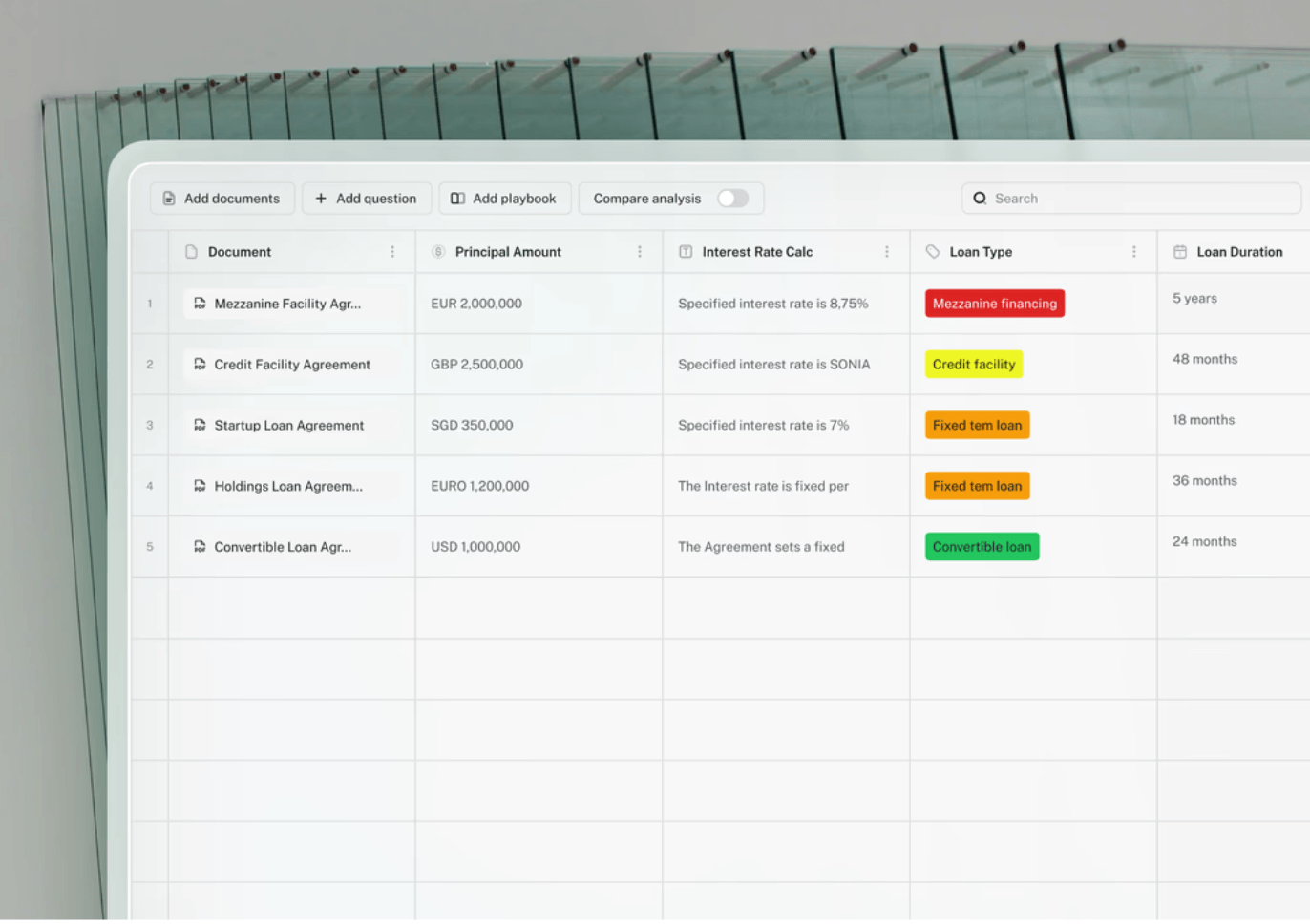
The same playbook can run across hundreds of legal documents simultaneously using LEGALFLY's Multi-Review agent. Auditing an entire supplier portfolio against a new regulation, or checking all incoming contracts against your standards, no longer requires reviewing each document individually. Manual effort is replaced by a structured, repeatable process, and the results are consistent every time.
Reviewing multiple legal documents at once
When volume is the problem, reviewing contracts one at a time is not a solution. LEGALFLY's Multi-Review agent processes hundreds of legal documents simultaneously, applying your playbooks across entire document sets in a single run. It improves efficiency significantly compared to manual review, particularly for legal tasks that involve vast amounts of incoming contracts or documents.
This is particularly useful for:
Regulatory compliance audits. Check whether existing contracts meet updated requirements. Multi-Review flags gaps, identifies non-compliant clauses, and gives you a high-level summary across the entire portfolio so you know exactly where to focus.
Supplier portfolio reviews. Identify inconsistencies and missing obligations across vendor contract sets. For legal teams supporting procurement functions, this replaces weeks of repetitive tasks with a single structured review.
Due diligence. When large document sets need to be triaged before your team can focus on the highest-risk areas, Multi-Review extracts key data, runs risk assessments clause by clause, and surfaces the issues that matter most. It helps legal professionals build stronger cases for negotiation by identifying precisely where third-party language deviates from your standards. This feature makes LEGALFLY a great tool for M&A due diligence.
Human oversight is retained throughout. The platform identifies the issues. Your team decides how to respond. Every output is documented and audit-ready.
Read more: How to use AI for contract review and analysis: a LEGALFLY guide
Drafting legal documents with LEGALFLY
Manual drafting creates consistent problems for in-house legal teams: human error, inconsistency, and policy drift. When team members draft from personal saved files, outdated clauses find their way into current agreements and standards slip across the document portfolio.
LEGALFLY's drafting capability is built around approved templates that reflect your risk position and language standards, reducing the human error that manual processes introduce.
Templates as the foundation
Templates in LEGALFLY are the blueprint for each contract type. Create them once, and your team reuses them without modification. They eliminate manual copy-paste work, prevent outdated language from slipping into new agreements, and ensure every contract starts from an approved structure. You can build templates from your existing contracts or adapt them from LEGALFLY's pre-built library, which covers 100+ document types.
Variables and conditional logic
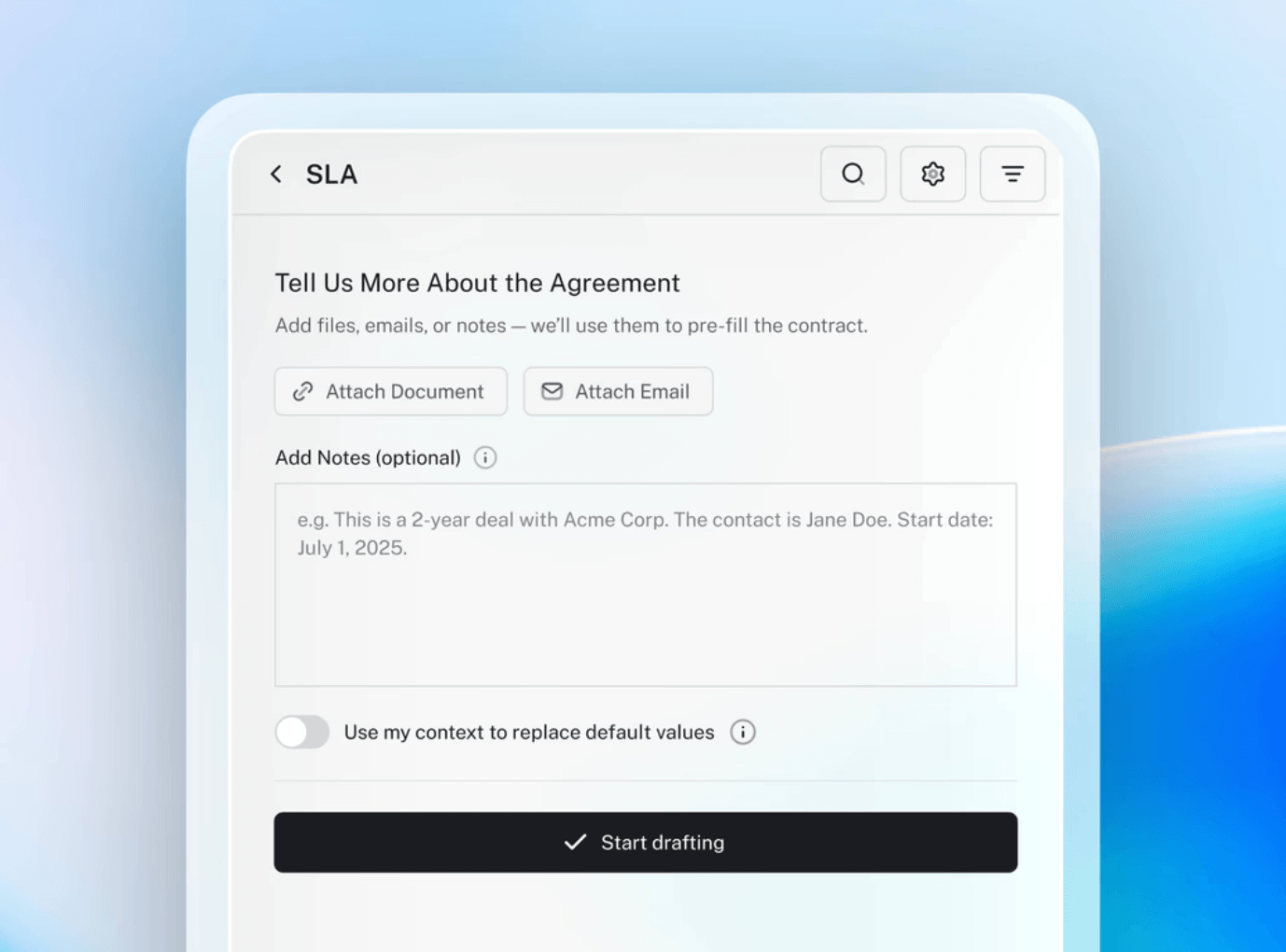
Each template uses variables to handle information that changes from contract to contract: party names, effective dates, contract values, jurisdiction. Conditional logic lets you include or exclude clauses automatically based on defined criteria. A specific indemnity clause can be triggered only when the contract value exceeds a threshold, or a data processing schedule can appear only where the jurisdiction requires it.
Drafting from inside Microsoft Word
The Draft Agent works directly within Microsoft Word. Your team opens a template, fills in a short set of variables, and LEGALFLY generates a first draft aligned to your standards. Drafting time is reduced by 50% compared to building from scratch. Every first draft is policy-compliant from the outset, which means fewer errors, fewer iterations, and less review time spent correcting avoidable issues. For legal drafting at scale, this is how in-house teams automate repetitive tasks without sacrificing quality or control.
Answering questions across your legal documents
Legal teams spend significant time searching for information that already exists in their documents. Renewal dates, liability limits, data processing obligations, governing law clauses: the answers are in the contracts, but finding them requires opening files and reading carefully to confirm you have the right clause.
LEGALFLY's Discovery feature changes how teams access legal information. Upload a document or a folder of legal documents and ask a plain-language question. Discovery searches across the content using legal AI technology and returns the relevant clause with its source. It can summarise key data across multiple documents, extract relevant information from case law references, surface discovery responses for litigation support tasks, and assist with case preparation by pulling the specific legal data your team needs quickly.
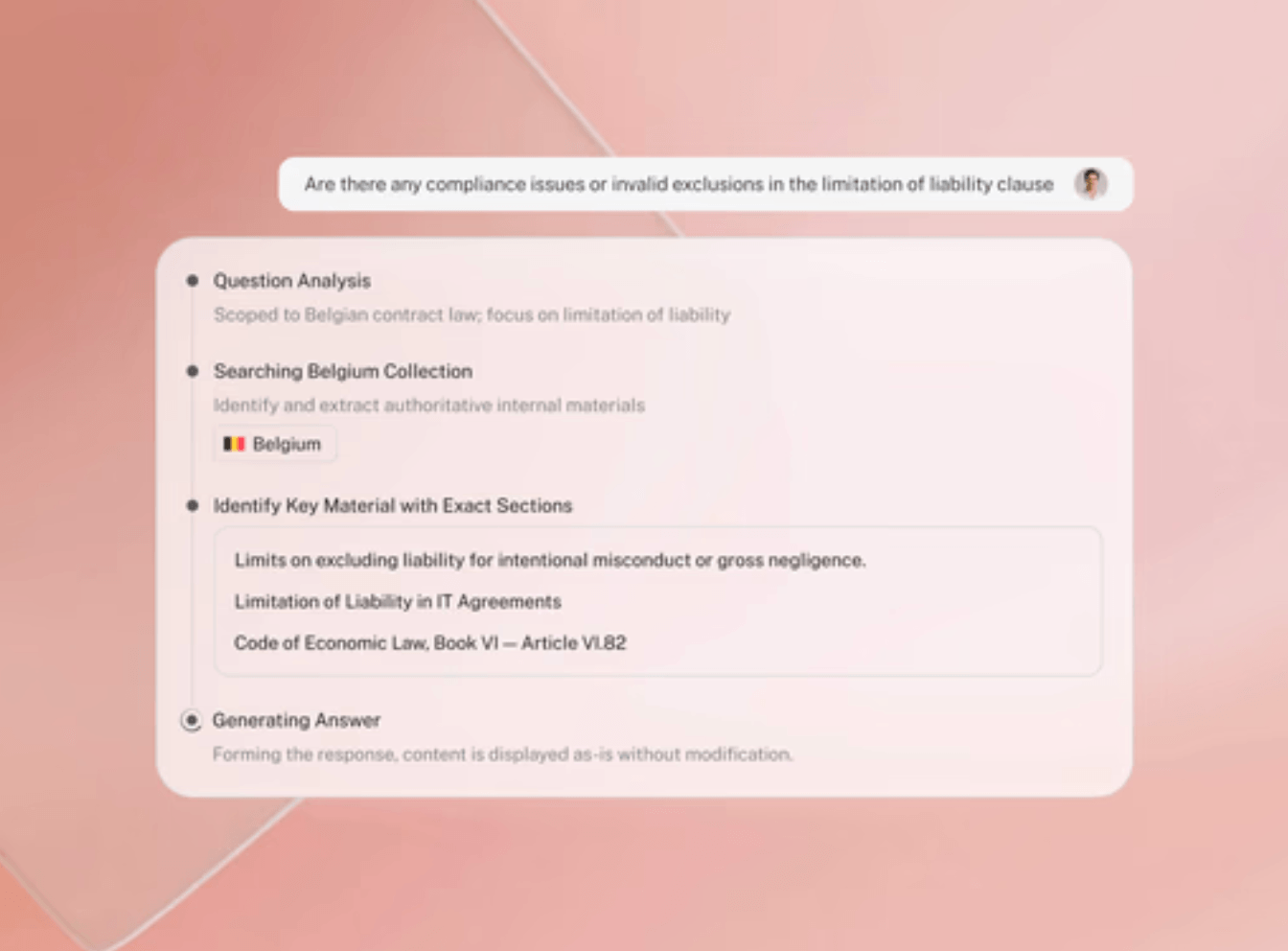
Non-legal teams can use Discovery to get answers to routine questions without involving legal every time. For legal professionals, it removes the manual effort of searching through dense regulatory documents or case files, saving time and improving efficiency across a wide range of legal tasks. It is also a practical tool for sharing client updates, enabling teams to get fast, source-backed answers from complex document sets without hours of manual research.
How Agristo streamlined legal document workflows with LEGALFLY
Agristo, a leading frozen food manufacturer, faced a challenge familiar to many enterprise in-house legal teams. As the business expanded, the volume of NDAs, supplier agreements, and construction contracts grew faster than the team could manage. Reviews covered multiple jurisdictions. Managers were overwhelmed. In some cases, stakeholders bypassed legal review entirely, relying on commercial instinct rather than legal certainty.
LEGALFLY gave the team a structured way to manage the volume. Managers now answer a short set of questions and receive a redlined document within minutes. Every change is explained in plain language. Legal no longer needs to be involved in every routine review, but when they are, the preliminary work is already done.

The Discovery module let the legal team upload entire folders of contracts and search them instantly, removing hours of manual document searching from their workflow. Because LEGALFLY integrates directly into Microsoft Word, there was no new system to learn and no document reformatting required.
The outcome: document review time dropped from two hours to fifteen minutes. The legal team regained oversight of the process without creating bottlenecks for the business. Managers became more confident in their decisions because risks had been identified and explained before they acted. LEGALFLY became a catalyst for wider operational efficiency across the organisation.
[Read the full Agristo case study here.]
Common concerns about legal AI, and how LEGALFLY addresses them
Many legal teams are interested in legal AI but cautious about the risks. LEGALFLY is designed to deal with these concerns from the start.
1. Data privacy
Legal documents often contain sensitive client or business information. LEGALFLY protects this by anonymising every legal or financial document before any AI model sees it. No names, companies, or other identifiable details are shared outside your system.
2. Clarity and explainability
AI should not feel like a black box. With LEGALFLY, every edit or suggestion comes with an explanation. You can see exactly what the AI changed, why it changed it, and where in the document the issue was found, so you can review and decide with full context.
3. Human oversight
AI doesn’t replace your legal team. It supports them. LEGALFLY makes reviewing and drafting faster, but lawyers stay in control. Every output can be reviewed, edited, or rejected before anything is finalised.
4. Lack of governance rules
Many organisations don’t yet have clear policies for how AI should be used in legal work. LEGALFLY includes built-in controls, including audit trails, permission settings, and structured checklists (called playbooks). These help you use it safely and consistently from day one.
Read more: Confidence, reliability and validity at LEGALFLY
Start working smarter with LEGALFLY
If your team is reviewing legal documents manually, drafting from inconsistent templates, or struggling to apply consistent standards across a growing document portfolio, LEGALFLY addresses each of those problems directly.
Review legal documents in 15 minutes with AI-powered, playbook-driven review. Draft from approved templates with drafting time cut by 50%. Run compliance checks across hundreds of contracts at once. Keep your team in control at every step, with full explainability and audit-ready outputs.
If you are ready to see how LEGALFLY handles your specific document workflows, book a demo at https://www.legalfly.com/demo.
Common questions about AI tools for legal documents
Which AI tool is best for legal documents?
The best AI tools for legal document work are purpose-built for legal use cases, not adapted from general AI platforms. For enterprise in-house legal teams, the key criteria are playbook-driven review, jurisdiction coverage, data security architecture, and integration with existing tools. LEGALFLY is designed specifically for in-house teams. It is ISO 27001 and SOC 2 Type II certified, supports expert-level analysis across 60+ jurisdictions, and works inside Microsoft Word and SharePoint. It handles documents in 80+ languages and offers deployment options including on-premises anonymisation for organisations with strict data residency requirements.
Can I use ChatGPT for legal documents?
General-purpose AI tools are not designed for legal document work. They lack playbook-driven legal reasoning, jurisdiction-specific analysis, human oversight workflows, and the security certifications that enterprise legal work requires. They also do not integrate with internal contract standards or document management systems. For professional legal use, a purpose-built legal AI platform provides the control, traceability, and accuracy that general tools cannot match. The use of general AI tools for confidential legal documents also raises questions about ethical standards and data privacy that in-house teams at regulated enterprises need to address carefully.
Is there a free AI tool to review legal documents?
Some tools offer limited free tiers with basic features. Enterprise in-house legal teams typically require the security certifications, audit trails, playbook functionality, and integrations that free or consumer tools do not provide. LEGALFLY is an enterprise platform. If your team is evaluating AI legal tools, book a demo to see what is right for your specific workflows and document volumes.